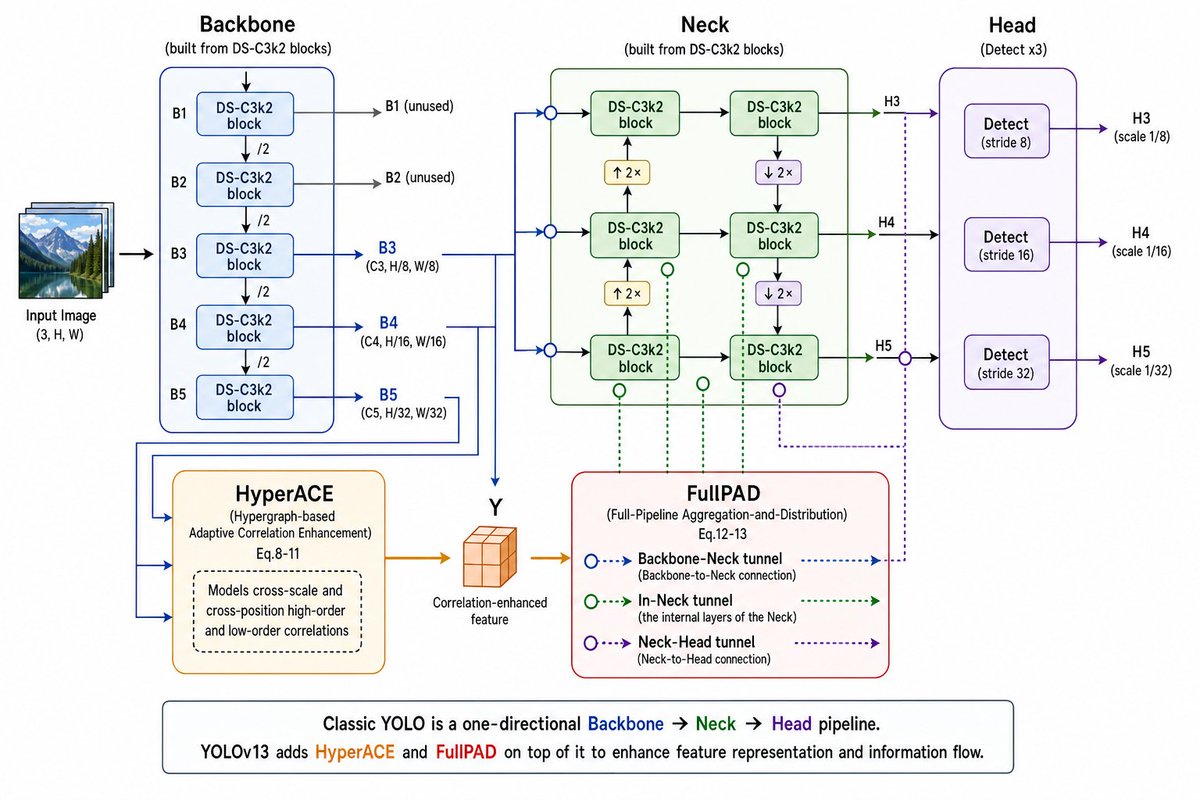
YOLOv13 架构图
生成一张清晰的技术信息图,解释包含 Backbone、HyperACE、Neck、FullPAD 以及三个检测头的 YOLOv13 流水线。
Goal: Create a clean technical architecture diagram explaining {argument name="model name" default="YOLOv13"} as a one-page educational slide, showing how an input image flows through Backbone, HyperACE, Neck, FullPAD, and Head detection outputs.

Canvas: Wide 16:9 landscape infographic on a white background, crisp vector style, thin colored outlines, rounded rectangles, arrowed connectors, and readable sans-serif text. Use a left-to-right pipeline with supplementary modules below the main path.

Layout: Start at far left with a small stacked thumbnail illustration labeled “Input Image (3, H, W)”, then an arrow into a large blue Backbone panel. Place the green Neck panel in the upper center, the purple Head panel on the right, HyperACE in the lower left-center, FullPAD in the lower center-right, and a boxed explanatory caption along the bottom.

Main pipeline sections and exact element counts:
- 1 Input Image stack at far left, shown as layered landscape photos.
- 1 Backbone panel titled “Backbone” with subtitle “(built from DS-C3k2 blocks)”. Inside it, show exactly 5 vertically stacked DS-C3k2 block boxes labeled B1, B2, B3, B4, B5. Put “/2” downsampling markers between each adjacent block, for exactly 4 downsampling labels. Add side output arrows: B1 and B2 go right and are labeled “B1 (unused)” and “B2 (unused)”; B3, B4, and B5 go right in blue and are labeled “B3 (C3, H/8, W/8)”, “B4 (C4, H/16, W/16)”, and “B5 (C5, H/32, W/32)”.
- 1 HyperACE module below the Backbone, orange outline, titled “HyperACE” with subtitle “(Hypergraph-based Adaptive Correlation Enhancement) Eq.8-11”. Inside it, include one dashed rounded note box saying “Models cross-scale and cross-position high-order and low-order correlations”. Blue lines from B3/B4/B5 feed into HyperACE. HyperACE outputs an orange arrow to a small orange 3D cube labeled “Y” and “Correlation-enhanced feature”.
- 1 Neck panel in the upper center, green outline, titled “Neck” with subtitle “(built from DS-C3k2 blocks)”. Inside it show exactly 6 DS-C3k2 block boxes arranged in a 2-column by 3-row grid. Use black arrows between blocks, with exactly 2 yellow upsample boxes labeled “↑ 2×” and exactly 2 purple downsample boxes labeled “↓ 2×”. Include 3 blue circular input junctions on the left edge of the Neck and 3 green/purple circular tunnel markers below or beside the grid.
- 1 FullPAD legend module below the Neck, red outline, titled “FullPAD” with subtitle “(Full-Pipeline Aggregation-and-Distribution) Eq.12-13”. Show exactly 3 legend rows: “Backbone–Neck tunnel (Backbone-to-Neck connection)” using blue dotted arrows and blue hollow circles; “In-Neck tunnel (the internal layers of the Neck)” using green dotted arrows and green hollow circles; “Neck–Head tunnel (Neck-to-Head connection)” using purple dotted arrows and purple hollow circles. Connect the cube feature into FullPAD with an orange arrow, and draw dotted blue/green/purple tunnel routes upward and rightward to the Neck and Head.
- 1 Head panel on the right, purple outline, titled “Head” with subtitle “(Detect x3)”. Inside it show exactly 3 vertically stacked Detect boxes: “Detect (stride 8)”, “Detect (stride 16)”, and “Detect (stride 32)”. Each receives one arrow from the Neck and outputs to the right as H3, H4, H5 with labels “H3 (scale 1/8)”, “H4 (scale 1/16)”, and “H5 (scale 1/32)”.

Color coding: Backbone lines and panel in blue, Neck in green, Head in purple, HyperACE in orange, FullPAD outline in red. Main arrows are solid; FullPAD tunnels are dotted/dashed with hollow circular nodes. Use subtle pastel fills for module boxes.

Bottom caption: Add one wide rounded rectangle spanning the lower width. Text: “Classic YOLO is a one-directional Backbone → Neck → Head pipeline.” Then on the next line: “{argument name="model name" default="YOLOv13"} adds HyperACE and FullPAD on top of it to enhance feature representation and information flow.” Color the words Backbone blue, Neck green, Head purple, HyperACE orange, and FullPAD red.

Constraints: Keep all labels legible, align sections neatly, preserve the exact counts of blocks and detect heads, avoid extra modules, avoid photorealism except for the small input image thumbnail, and do not add a watermark.
目标:创建一张清晰的技术架构图,将 {argument name="model name" default="YOLOv13"} 解释为一页教育性 Slides,展示输入图像如何流经 Backbone、HyperACE、Neck、FullPAD 和 Head 检测输出。
画布:16:9 宽屏横向信息图,白色背景,清爽的矢量风格,细彩色轮廓,圆角矩形,带箭头的连接线,以及易读的无衬线字体。使用从左到右的流水线布局,并在主路径下方放置补充模块。
布局:最左侧放置一个小型的堆叠缩略图,标注为“输入图像 (Input Image) (3, H, W)”,然后通过箭头指向一个大型蓝色 Backbone 面板。将绿色 Neck 面板放置在上方中央,紫色 Head 面板放置在右侧,HyperACE 放置在左下方中央,FullPAD 放置在右下方中央,并在底部放置一个带框的说明性标题。
主要流水线部分及精确元素计数:
- 最左侧 1 个输入图像堆叠,显示为分层的横向照片。
- 1 个 Backbone 面板,标题为“Backbone”,副标题为“(基于 DS-C3k2 模块构建)”。在内部,精确显示 5 个垂直堆叠的 DS-C3k2 模块框,分别标注为 B1、B2、B3、B4、B5。在每个相邻模块之间放置“/2”下采样标记,共 4 个下采样标签。添加侧向输出箭头:B1 和 B2 指向右侧,标注为“B1 (未使用)”和“B2 (未使用)”;B3、B4 和 B5 以蓝色指向右侧,标注为“B3 (C3, H/8, W/8)”、“B4 (C4, H/16, W/16)”和“B5 (C5, H/32, W/32)”。
- 1 个 HyperACE 模块位于 Backbone 下方,橙色轮廓,标题为“HyperACE”,副标题为“(基于超图的自适应相关性增强) Eq.8-11”。在内部,包含一个虚线圆角注释框,写着“对跨尺度和跨位置的高阶及低阶相关性进行建模”。来自 B3/B4/B5 的蓝色线条输入到 HyperACE 中。HyperACE 输出一个橙色箭头指向一个标注为“Y”和“相关性增强特征 (Correlation-enhanced feature)”的小型橙色 3D 立方体。
- 1 个 Neck 面板位于上方中央,绿色轮廓,标题为“Neck”,副标题为“(基于 DS-C3k2 模块构建)”。在内部,精确显示 6 个 DS-C3k2 模块框,排列成 2 列 3 行的网格。在模块之间使用黑色箭头,包含 2 个标注为“↑ 2×”的黄色上采样框和 2 个标注为“↓ 2×”的紫色下采样框。在 Neck 左边缘包含 3 个蓝色圆形输入连接点,并在网格下方或侧面包含 3 个绿色/紫色圆形隧道标记。
- 1 个 FullPAD 图例模块位于 Neck 下方,红色轮廓,标题为“FullPAD”,副标题为“(全流水线聚合与分发) Eq.12-13”。显示 3 行图例:“Backbone–Neck 隧道 (Backbone 到 Neck 的连接)”,使用蓝色虚线箭头和蓝色空心圆;“Neck 内部隧道 (Neck 的内部层)”,使用绿色虚线箭头和绿色空心圆;“Neck–Head 隧道 (Neck 到 Head 的连接)”,使用紫色虚线箭头和紫色空心圆。用橙色箭头将立方体特征连接到 FullPAD,并绘制指向 Neck 和 Head 的蓝色/绿色/紫色虚线隧道路径。
- 1 个 Head 面板位于右侧,紫色轮廓,标题为“Head”,副标题为“(检测 x3)”。在内部,精确显示 3 个垂直堆叠的 Detect 框:“Detect (步长 8)”、“Detect (步长 16)”和“Detect (步长 32)”。每个框接收来自 Neck 的一个箭头,并向右输出为 H3、H4、H5,标注为“H3 (尺度 1/8)”、“H4 (尺度 1/16)”和“H5 (尺度 1/32)”。
颜色编码:Backbone 线条和面板为蓝色,Neck 为绿色,Head 为紫色,HyperACE 为橙色,FullPAD 轮廓为红色。主箭头为实线;FullPAD 隧道为虚线/点划线,带有空心圆形节点。模块框使用柔和的淡色填充。
底部标题:添加一个横跨底部的宽圆角矩形。文字:“经典的 YOLO 是一个单向的 Backbone → Neck → Head 流水线。” 接着在下一行:“{argument name="model name" default="YOLOv13"} 在此基础上增加了 HyperACE 和 FullPAD,以增强特征表示和信息流。” 将 Backbone、Neck、Head、HyperACE 和 FullPAD 等词分别着色为蓝色、绿色、紫色、橙色和红色。
约束:保持所有标签清晰易读,各部分对齐整齐,保留模块和检测头的精确数量,避免添加额外的模块,除小型输入图像缩略图外避免照片级真实感,且不要添加水印。