Infographic / Edu Visual - Whiteboard Skill-Building Workflow
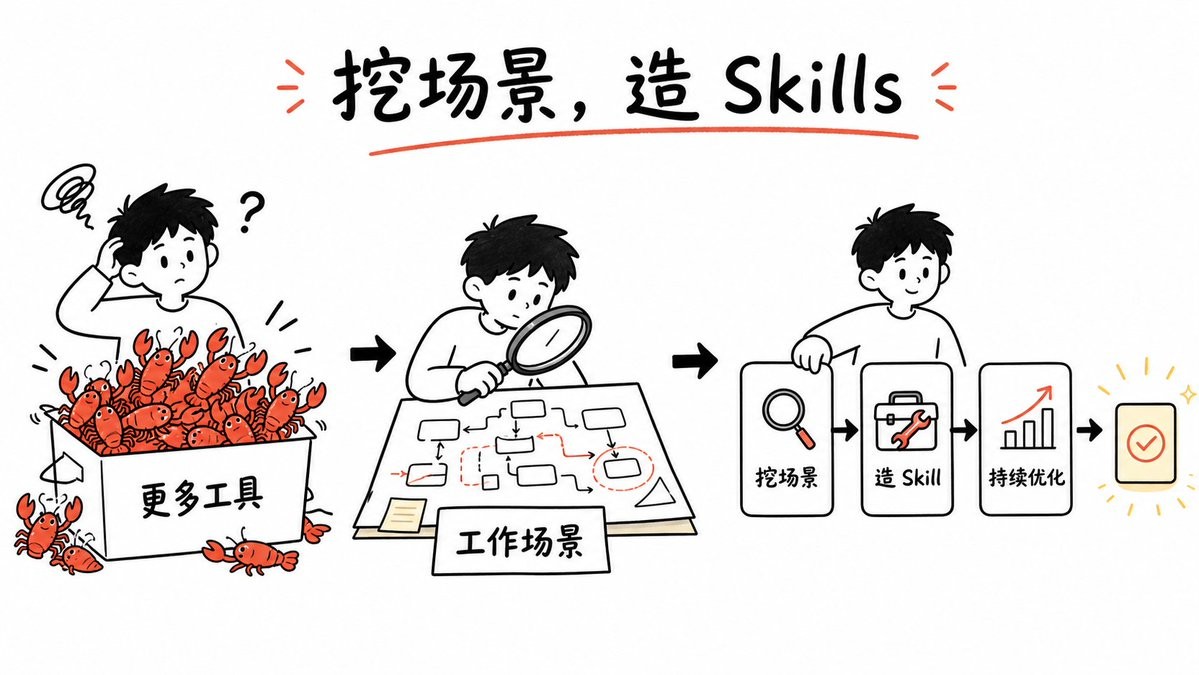
一张手绘风格的白板说明图,展示了如何通过场景分析与优化,将混乱的工具堆叠转化为可复用的技能。
Goal: Create a clean whiteboard hand-drawn explainer illustration about turning messy tool overload into reusable GPT image skills. Use a playful black marker sketch style with selective red-orange accents and a few yellow highlights.

Canvas: Wide 16:9 horizontal canvas, white background, generous margins, centered composition. Hand-drawn black outlines, slightly imperfect marker strokes, minimal shading, no photorealism.

Title: At the top center, write the large handwritten headline {argument name="headline text" default="挖场景,造 Skills"}. Use bold black brush lettering, underline it with one red-orange curved stroke, and add two small red-orange emphasis marks on each side of the title.

Layout: Arrange the story as a left-to-right workflow with three main illustrated scenes connected by bold black arrows. Scene 1 on the left shows confusion and too many tools; scene 2 in the center shows analyzing the work scenario; scene 3 on the right shows a simplified skill-building pipeline.

Scene 1: Draw a confused young person with short black hair scratching their head, a question mark beside them, and a scribbly frustration cloud above. They stand behind a large open box labeled {argument name="tool box label" default="更多工具"}. The box is overflowing with exactly 18 small red-orange cartoon crawfish/lobsters as a metaphor for too many tools: 15 visible inside or on the rim of the box and 3 outside near the bottom/left edges. Each crawfish has simple black eyes, claws, and segmented bodies. Add small motion lines around the box.

Scene 2: Draw the same young person leaning over a table with a magnifying glass, studying a paper workflow map. The paper contains a hand-drawn process diagram with exactly 10 small rounded rectangles/nodes, thin black connector arrows, and a few red dashed boxes and red arrows marking important points. Add a small sticky note on the lower left of the paper. In front of the table, place a rectangular label card reading {argument name="scenario label" default="工作场景"}.

Scene 3: Draw the same young person smiling and holding or leaning on the first card of a pipeline. The pipeline contains exactly 4 visible cards/icons arranged horizontally: card 1 with a magnifying glass icon and label {argument name="step one label" default="挖场景"}; card 2 with a toolbox/wrench icon and label {argument name="step two label" default="造 Skill"}; card 3 with an upward bar chart and red rising arrow icon labeled {argument name="step three label" default="持续优化"}; card 4 is a small rounded square success card with a red-orange checkmark, surrounded by short yellow radiating lines and sparkle marks. Connect the cards with bold black arrows.

Visual style: Simple black-and-white whiteboard illustration, friendly Notion-like doodle proportions, rounded characters, thick marker outlines, sparse red-orange accent color on crawfish, arrows, tools, underlines, and chart arrow. Keep the background empty and uncluttered.

Constraints: Preserve the left-to-right narrative and the exact counts of the three main scenes, 18 crawfish/lobsters, 10 workflow nodes, and 4 pipeline cards. Do not add extra panels, logos, watermarks, or dense explanatory text.
目标:创作一张简洁的手绘风格白板说明图,展示如何将混乱的工具堆叠转化为可复用的 GPT 图像技能。使用趣味十足的黑色记号笔素描风格,辅以局部的红橙色点缀和少量黄色高光。
画布:宽屏 16:9 横向画布,白色背景,留白充裕,构图居中。手绘黑色轮廓,笔触略显不完美,阴影极少,非写实风格。
标题:在顶部中央,书写醒目的手写标题 {argument name="headline text" default="挖场景,造 Skills"}。使用粗体黑色笔刷字体,下方用一条红橙色曲线下划线,并在标题两侧各添加两个红橙色强调符号。
布局:将故事安排为从左到右的工作流,通过粗黑色箭头连接三个主要场景。左侧场景 1 展示混乱和过多的工具;中间场景 2 展示分析工作场景;右侧场景 3 展示简化的技能构建流水线。
场景 1:画一个抓着头的短发年轻人,神情困惑,身边有一个问号,头顶上方有涂鸦式的烦恼云。他们站在一个标有 {argument name="tool box label" default="更多工具"} 的大开口盒子后面。盒子里溢出了 18 只红橙色的小卡通小龙虾,作为工具过多的隐喻:盒内或边缘可见 15 只,盒子左下角外侧有 3 只。每只小龙虾都有简单的黑色眼睛、钳子和分节的身体。在盒子周围添加少量运动线条。
场景 2:画同一个年轻人俯身在桌前,拿着放大镜研究一张工作流地图。纸上包含一张手绘流程图,有 10 个圆角矩形/节点、细黑色连接箭头,以及几个标记重要点的红色虚线框和红色箭头。在纸的左下角贴一张小便利贴。在桌子前方,放置一张矩形标签卡,上面写着 {argument name="scenario label" default="工作场景"}。
场景 3:画同一个年轻人微笑着,拿着或靠在流水线的第一张卡片上。流水线包含 4 张水平排列的可见卡片/图标:卡片 1 是放大镜图标,标签为 {argument name="step one label" default="挖场景"};卡片 2 是工具箱/扳手图标,标签为 {argument name="step two label" default="造 Skill"};卡片 3 是向上柱状图和红色上升箭头图标,标签为 {argument name="step three label" default="持续优化"};卡片 4 是一个小圆角方形成功卡片,带有一个红橙色对勾,周围有黄色放射状短线和闪光符号。用粗黑色箭头连接这些卡片。
视觉风格:简洁的黑白白板插画,类似 Notion 的涂鸦比例,角色圆润,记号笔轮廓粗犷,在小龙虾、箭头、工具、下划线和图表箭头处使用稀疏的红橙色作为强调色。保持背景空旷、整洁。
约束:保留从左到右的叙事逻辑,严格遵守 3 个主要场景、18 只小龙虾、10 个工作流节点和 4 张流水线卡片的数量要求。不要添加额外的面板、Logo、水印或密集的解释性文字。