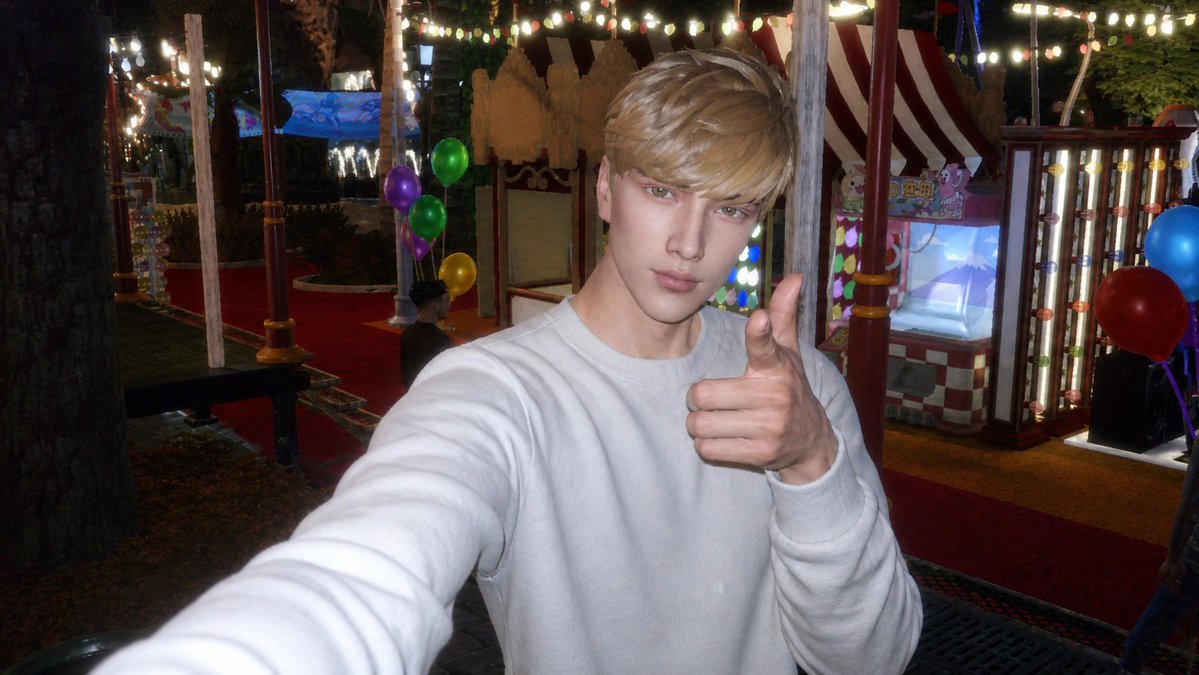
将 Sims 4 截图转换为 CCD 嘉年华自拍
将一张 Sims 4 游戏截图转换为具有怀旧感的 CCD 风格闪光灯游乐园自拍,适合社交媒体照片编辑。
Using the provided reference image as the Sims 4 character base, transform it into a realistic {argument name="photo style" default="CCD digital camera flash photo"} rather than a game screenshot. Repose the character as a close-up arm’s-length selfie, wearing a {argument name="outfit" default="plain white sweatshirt"}, with one arm extended toward the camera and the other hand giving a thumbs-up. Change the setting to a {argument name="new setting" default="nighttime amusement park or carnival"} with strong on-camera flash, slightly harsh highlights, low-light noise, mild blur, and nostalgic compact-camera colors. Add a festive background with red carpet walkways, striped carnival booths, glowing marquee bulbs, string lights, trees, and exactly 6 visible balloons: 4 on the left side in purple, green, green, and yellow, and 2 on the right side in blue and red. Keep the overall face-obscuring square censorship from the reference, but make the image look like an authentic casual snapshot rather than a rendered scene.以提供的参考图像作为 Sims 4 角色基础,将其转换为逼真的 {argument name="photo style" default="CCD 数码相机闪光灯照片"},而非游戏截图。将角色调整为近距离手持自拍姿势,身穿 {argument name="outfit" default="纯白色卫衣"},一只手臂伸向镜头,另一只手比出大拇指。将场景更改为 {argument name="new setting" default="夜间游乐园或嘉年华"},呈现强烈的机顶闪光灯效果、略显生硬的高光、低光噪点、轻微模糊以及怀旧的卡片机色彩。添加充满节日氛围的背景,包括红地毯步道、条纹嘉年华摊位、发光的灯箱灯泡、串灯、树木,以及正好 6 个可见的气球:左侧 4 个分别为紫色、绿色、绿色和黄色,右侧 2 个分别为蓝色和红色。保留参考图中遮挡面部的方形马赛克,但使整体图像看起来像是一张真实的随手拍照片,而非渲染场景。