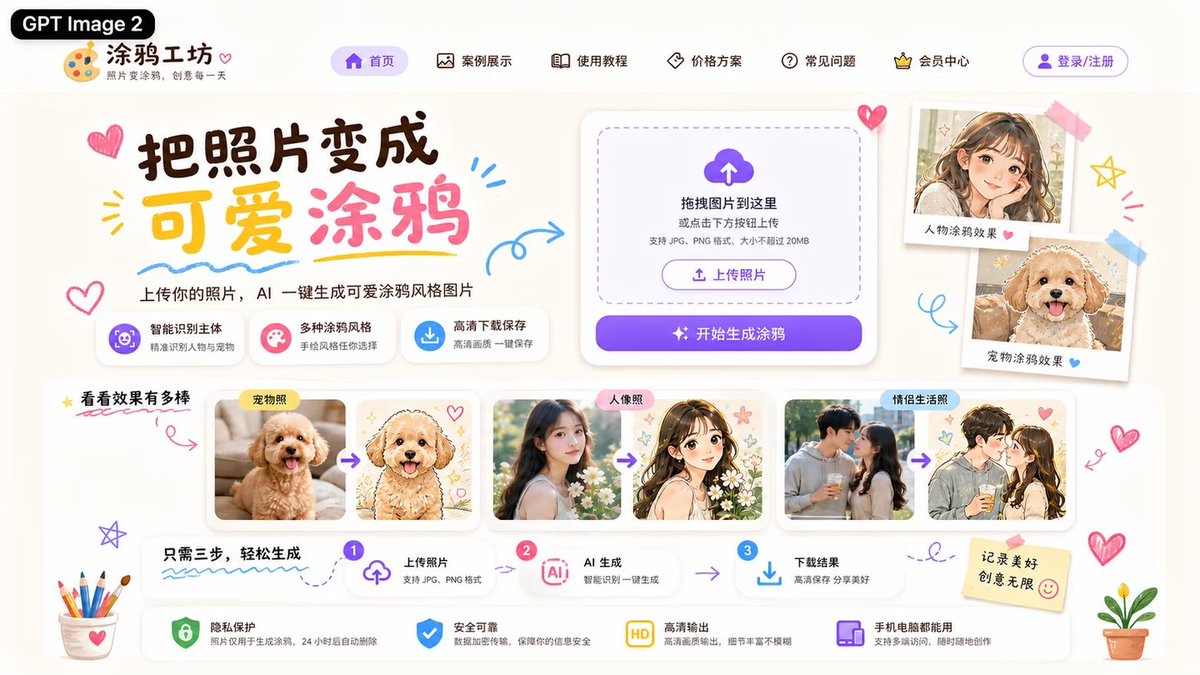
可爱 AI 涂鸦生成器落地页
一个精致的中文网页落地页模型,用于展示将照片转换为可爱涂鸦风格插画的 AI 工具。
Goal: Create a cute Chinese landing-page UI mockup for an AI website that turns photos into adorable hand-drawn doodle illustrations, branded as {argument name="product name" default="涂鸦工坊"} and tagged with a black pill label reading {argument name="model label" default="GPT Image 2"}.

Canvas: Wide 16:9 web hero screenshot, approximately 1200×675, warm off-white paper background, soft shadows, rounded cards, pastel purple, pink, yellow, and sky-blue accents. Use a playful kawaii stationery style with doodled hearts, arrows, stars, scribbles, stickers, tape, colored pencils, and small potted plants around the edges.

Header: At top left place the black rounded label “GPT Image 2”, then a palette icon logo and the site name “涂鸦工坊” with the small subtitle “照片变涂鸦,创意每一天”. Across the top navigation show exactly 6 menu items with simple line icons: “首页” highlighted in a purple pill, “案例展示”, “使用教程”, “价格方案”, “常见问题”, and “会员中心”. At the far right add a purple outlined login button labeled “登录/注册”.

Hero section: On the left, create a large brush-style headline reading {argument name="headline text" default="把照片变成 可爱涂鸦"}, with “可爱” in yellow and “涂鸦” in pink, surrounded by doodle hearts and underline strokes. Under it add the subheading “上传你的照片,AI 一键生成可爱涂鸦风格图片”. Below the subheading place exactly 3 feature chips: 1) purple icon “智能识别主体 / 精准识别人像与宠物”, 2) pink icon “多种涂鸦风格 / 手绘风格任你选择”, 3) blue download icon “高清下载保存 / 高清画质一键保存”.

Upload card: On the center-right place a large white rounded upload panel with a dashed rounded drop zone, a purple cloud-upload icon, and the text “拖拽图片到这里 或点击下方按钮上传”, plus smaller text “支持 JPG、PNG 格式,大小不超过 20MB”. Inside it include a small outlined button “上传照片”, and below it a large purple gradient primary button reading “开始生成涂鸦” with sparkle icons.

Right showcase stickers: To the right of the upload card, show exactly 2 tilted polaroid-style sample cards taped to the page: 1) a cute anime-style girl portrait labeled “人物涂鸦效果” with a pink heart, 2) a fluffy dog doodle portrait labeled “宠物涂鸦效果” with a blue heart.

Example gallery: Below the hero, create a section title “看看效果有多棒” with a yellow star and a red underline. Show exactly 3 before-to-after comparison groups in white rounded cards, each group containing two images separated by a purple arrow: 1) labeled “宠物照”, a real fluffy apricot puppy photo transformed into a cute hand-drawn puppy illustration with hearts, 2) labeled “人像照”, a real young woman portrait transformed into a soft anime girl illustration with flowers and stars, 3) labeled “情侣生活照”, a couple photo transformed into a romantic anime couple doodle. Keep the after-images pastel, clean, and adorable.

Process strip: Under the gallery, create a three-step horizontal guide titled “只需三步,轻松生成”. Show exactly 3 numbered steps connected by arrows: step 1 “上传照片 / 支持 JPG、PNG 格式” with an upload icon, step 2 “AI 生成 / 智能识别一键生成” with an AI chip icon, step 3 “下载结果 / 高清保存 分享美好” with a download icon.

Bottom assurance bar: Along the bottom place exactly 4 trust feature cards with icons: 1) green shield “隐私保护 / 照片仅用于生成涂鸦,24小时后自动删除”, 2) blue shield-check “安全可靠 / 数据加密传输,保障你的信息安全”, 3) yellow HD badge “高清输出 / 高清画质输出,细节丰富不模糊”, 4) purple device icon “手机电脑都能用 / 支持多端访问,随时随地创作”. Add a sticky note on the right reading {argument name="sticky note text" default="记录美好 创意无限"} with a smiley face.

Visual style: Modern polished UI/UX design, highly legible Chinese typography, playful hand-drawn accents, soft cream background, glassy rounded white cards, subtle drop shadows, purple CTA gradient, adorable doodle illustration aesthetic. Avoid browser chrome, watermarks, or extra unlisted sections.
目标:为一款将照片转换为可爱手绘涂鸦插画的 AI 网站创建一个可爱的中文落地页 UI 模型,品牌名为 {argument name="product name" default="涂鸦工坊"},并贴上一个写有 {argument name="model label" default="GPT Image 2"} 的黑色胶囊标签。
画布:宽屏 16:9 网页首屏截图,尺寸约为 1200×675,暖米白色纸张背景,柔和阴影,圆角卡片,点缀淡紫色、粉色、黄色和天蓝色。采用俏皮的可爱文具风格,边缘装饰有涂鸦爱心、箭头、星星、乱涂乱画、贴纸、胶带、彩色铅笔和小盆栽。
页眉:左上角放置黑色圆角标签“GPT Image 2”,紧随其后的是调色板图标 Logo 和网站名称“涂鸦工坊”,下方配有小副标题“照片变涂鸦,创意每一天”。顶部导航栏显示 6 个带有简约线条图标的菜单项:“首页”(以紫色胶囊高亮显示)、“案例展示”、“使用教程”、“价格方案”、“常见问题”和“会员中心”。最右侧添加一个紫色轮廓的“登录/注册”按钮。
首屏区域:左侧创建一个大号笔刷风格的标题 {argument name="headline text" default="把照片变成 可爱涂鸦"},其中“可爱”为黄色,“涂鸦”为粉色,周围环绕着涂鸦爱心和下划线笔触。下方添加副标题“上传你的照片,AI 一键生成可爱涂鸦风格图片”。副标题下方放置 3 个功能标签:1) 紫色图标“智能识别主体 / 精准识别人像与宠物”,2) 粉色图标“多种涂鸦风格 / 手绘风格任你选择”,3) 蓝色下载图标“高清下载保存 / 高清画质一键保存”。
上传卡片:中右侧放置一个白色大圆角上传面板,包含虚线圆角拖拽区、紫色云上传图标,以及文字“拖拽图片到这里 或点击下方按钮上传”,并附带小字“支持 JPG、PNG 格式,大小不超过 20MB”。内部包含一个小型轮廓按钮“上传照片”,下方是一个带有闪烁图标的紫色渐变主按钮,写着“开始生成涂鸦”。
右侧展示贴纸:在上传卡片右侧,展示 2 张用胶带贴在页面上的倾斜拍立得风格样本卡片:1) 一张可爱的动漫风格女孩肖像,标注“人物涂鸦效果”,配有粉色爱心;2) 一张毛茸茸的小狗涂鸦肖像,标注“宠物涂鸦效果”,配有蓝色爱心。
案例画廊:在首屏下方,创建一个标题为“看看效果有多棒”的区域,配有黄色星星和红色下划线。展示 3 组白色圆角卡片形式的对比图,每组包含两张由紫色箭头分隔的图片:1) 标注“宠物照”,将一张真实的毛茸茸杏色小狗照片转换为带有爱心的可爱手绘小狗插画;2) 标注“人像照”,将一张真实的年轻女性肖像转换为带有花朵和星星的柔和动漫女孩插画;3) 标注“情侣生活照”,将一张情侣照片转换为浪漫的动漫情侣涂鸦。确保生成后的图片风格清新、可爱、色调柔和。
流程条:在画廊下方,创建一个标题为“只需三步,轻松生成”的三步水平引导。展示 3 个由箭头连接的数字步骤:步骤 1“上传照片 / 支持 JPG、PNG 格式”(配上传图标),步骤 2“AI 生成 / 智能识别一键生成”(配 AI 芯片图标),步骤 3“下载结果 / 高清保存 分享美好”(配下载图标)。
底部保障栏:底部放置 4 个带有图标的信任功能卡片:1) 绿色盾牌“隐私保护 / 照片仅用于生成涂鸦,24小时后自动删除”,2) 蓝色盾牌勾选“安全可靠 / 数据加密传输,保障你的信息安全”,3) 黄色高清徽章“高清输出 / 高清画质输出,细节丰富不模糊”,4) 紫色设备图标“手机电脑都能用 / 支持多端访问,随时随地创作”。右侧添加一张写有 {argument name="sticky note text" default="记录美好 创意无限"} 的便签纸,并配有一个笑脸。
视觉风格:现代精致的 UI/UX 设计,清晰易读的中文排版,俏皮的手绘装饰,柔和的奶油色背景,玻璃质感圆角白卡,细腻的投影,紫色 CTA 渐变,可爱的涂鸦插画美学。避免出现浏览器边框、水印或额外的未列出区域。