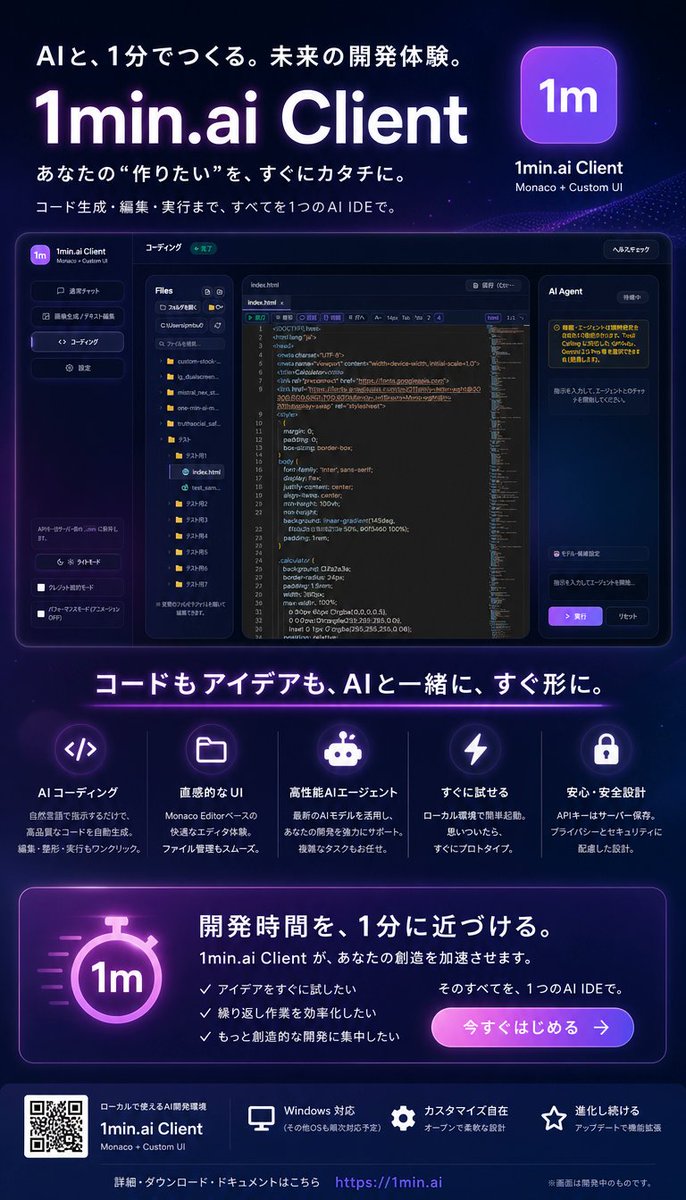
霓虹风格日语 AI IDE 落地页海报
一张深色霓虹风格的日语 SaaS 海报,用于推广一款具有未来感的 AI 编程 IDE,包含应用模型、功能卡片、CTA、二维码及页脚链接。
Goal: Create a polished Japanese promotional landing-page style poster for {argument name="product name" default="1min.ai Client"}, advertising an AI IDE that helps users build quickly. The design should feel like a futuristic SaaS launch graphic for developers, with a premium dark neon aesthetic.

Canvas: Vertical 4:5 poster, approximately 720×1040 px, dark navy-to-black gradient background with subtle stars, particles, purple glow, blue highlights, and soft radial light effects. Use crisp modern Japanese typography with large bold white headings and purple neon accents.

Top hero section: At the top left, add the Japanese tagline 「AIと、1分でつくる。未来の開発体験。」. Below it, place a huge glowing title “{argument name="headline text" default="1min.ai Client"}” in white with a purple aura. Under the title, add two Japanese lines: 「あなたの “作りたい” を、すぐにカタチに。」 and 「コード生成・編集・実行まで、すべてを1つのAI IDEで。」. At the top right, show a rounded square purple app icon with “1m” in white, with the label “1min.ai Client” and smaller text “Monaco + Custom UI”.

Central product mockup: Place a large dark glassmorphism desktop app screenshot centered beneath the hero text. The app window has rounded corners, a thin purple-blue border, and multiple panels. Include exactly 4 main app regions: a left vertical sidebar with the 1m logo and navigation buttons, a file explorer panel listing folders and files, a central code editor with syntax-highlighted HTML/CSS-like code and line numbers, and a right “AI Agent” chat/task panel with Japanese helper text and a purple execute button. The app UI should look like a Monaco-editor based IDE, with dark panels, tiny Japanese labels, folder icons, tabs, and status pills.

Middle headline and feature row: Beneath the mockup, add a large centered Japanese headline: 「コードもアイデアも、AIと一緒に、すぐ形に。」 with a thin purple neon underline. Below it, create exactly 5 feature cards in a horizontal row, each separated by subtle vertical lines, each with a glowing circular icon, Japanese title, and short Japanese description. The 5 visible features are: 1) code brackets icon, title 「AIコーディング」; 2) folder icon, title 「直感的なUI」; 3) robot icon, title 「高性能AIエージェント」; 4) lightning bolt icon, title 「すぐに試せる」; 5) lock icon, title 「安心・安全設計」.

Call-to-action panel: Near the lower third, add a wide rounded rectangle card with purple border glow. On the left, include a large glowing stopwatch icon containing “1m”. On the right, add the bold Japanese headline 「開発時間を、1分に近づける。」, followed by text saying 「1min.ai Client が、あなたの創造を加速させます。」. Include exactly 3 check-mark bullet points: 「アイデアをすぐに試したい」, 「繰り返し作業を効率化したい」, 「もっと創造的な開発に集中したい」. Add supporting text 「そのすべてを、1つのAI IDEで。」 and a rounded purple-to-pink gradient button labeled 「今すぐはじめる →」.

Footer: At the bottom, use a darker footer strip. On the left place a visible QR code block, next to product text “1min.ai Client” and “Monaco + Custom UI”. Across the footer, show exactly 3 small capability items with icons: monitor icon 「Windows 対応」, gear icon 「カスタマイズ自在」, star icon 「進化し続ける」. Along the very bottom center, include 「詳細・ダウンロード・ドキュメントはこちら」 followed by the URL “{argument name="website URL" default="https://1min.ai"}”. Add a tiny note on the bottom right: 「※画面は開発中のものです。」

Visual style: High-end cyberpunk developer-tool advertisement, dark glass UI, neon purple and electric blue lighting, soft bloom, sharp interface details, realistic SaaS mockup, clean spacing, luminous icons, Japanese tech startup branding. Keep all text legible and aligned. No people, no extra logos, no watermark.
目标:为 {argument name="product name" default="1min.ai Client"} 创建一张精美的日语宣传落地页风格海报,推广一款帮助用户快速构建应用的 AI IDE。设计应呈现出面向开发者的未来感 SaaS 发布图形,采用高端深色霓虹美学。
画布:竖向 4:5 海报,尺寸约为 720×1040 px,采用深海军蓝到黑色的渐变背景,点缀细微的星光、粒子、紫色光晕、蓝色高光以及柔和的径向光效。使用清晰的现代日语排版,搭配醒目的白色粗体标题和紫色霓虹装饰。
顶部 Hero 区:在左上角添加日语标语「AIと、1分でつくる。未来の開発体験。」(用 AI,1 分钟构建。未来的开发体验。)。下方放置一个巨大的发光标题 “{argument name="headline text" default="1min.ai Client"}”,白色字体带有紫色光晕。在标题下方,添加两行日语: 「あなたの “作りたい” を、すぐにカタチに。」(将你的“想做之物”立即成形。)以及 「コード生成・編集・実行まで、すべてを1つのAI IDEで。」(从代码生成、编辑到执行,一切尽在一个 AI IDE 中。)在右上角,展示一个圆角方形的紫色应用图标,内含白色 “1m” 字样,标签为 “1min.ai Client”,下方附带较小的文字 “Monaco + Custom UI”。
中央产品模型:在 Hero 文字下方居中放置一张大型深色玻璃拟态桌面应用截图。应用窗口具有圆角、细窄的紫蓝色边框和多个面板。包含 4 个核心应用区域:左侧垂直侧边栏(带有 1m 标志和导航按钮)、文件资源管理器面板(列出文件夹和文件)、中央代码编辑器(带有语法高亮显示和行号的 HTML/CSS 代码)以及右侧的 “AI Agent” 聊天/任务面板(包含日语辅助文本和紫色执行按钮)。应用 UI 应看起来像基于 Monaco 编辑器的 IDE,具有深色面板、微小的日语标签、文件夹图标、标签页和状态胶囊。
中部标题与功能行:在模型下方,添加一个居中的大型日语标题:「コードもアイデアも、AIと一緒に、すぐ形に。」(代码与创意,与 AI 一起,立即成形。),并带有细窄的紫色霓虹下划线。下方水平排列 5 张功能卡片,每张卡片之间用细微的垂直线隔开,每张卡片配有发光的圆形图标、日语标题和简短的日语描述。5 个可见功能为:1) 代码括号图标,标题「AIコーディング」(AI 编码);2) 文件夹图标,标题「直感的なUI」(直观的 UI);3) 机器人图标,标题「高性能AIエージェント」(高性能 AI Agent);4) 闪电图标,标题「すぐに試せる」(即刻尝试);5) 锁图标,标题「安心・安全設計」(安心安全设计)。
行动号召 (CTA) 面板:在下三分之一处,添加一个带有紫色边框光效的宽圆角矩形卡片。左侧包含一个巨大的发光秒表图标,内含 “1m”。右侧添加醒目的日语标题「開発時間を、1分に近づける。」(让开发时间,接近 1 分钟。),随后是文本「1min.ai Client が、あなたの創造を加速させます。」(1min.ai Client 将加速你的创造力。)。包含 3 个勾选符号列表项:「アイデアをすぐに試したい」(想立即尝试创意)、 「繰り返し作業を効率化したい」(想简化重复性工作)、 「もっと創造的な開発に集中したい」(想专注于更具创造性的开发)。添加辅助文本「そのすべてを、1つのAI IDEで。」(这一切,尽在一个 AI IDE 中。)以及一个圆角紫色到粉色的渐变按钮,标注为「今すぐはじめる →」(立即开始 →)。
页脚:在底部使用较暗的页脚条。左侧放置一个可见的二维码块,旁边是产品文字 “1min.ai Client” 和 “Monaco + Custom UI”。在页脚横向展示 3 个带有图标的小型能力项:显示器图标「Windows 対応」(支持 Windows)、齿轮图标「カスタマイズ自在」(自由定制)、星星图标「進化し続ける」(持续进化)。在最底部中心,包含「詳細・ダウンロード・ドキュメントはこちら」(详情、下载、文档请点击此处)以及 URL “{argument name="website URL" default="https://1min.ai"}”。在右下角添加一行小字:「※画面は開発中のものです。」(※屏幕画面为开发中版本。)
视觉风格:高端赛博朋克开发者工具广告,深色玻璃 UI,霓虹紫与电光蓝灯光,柔和光晕,锐利的界面细节,逼真的 SaaS 模型,整洁的间距,发光图标,日语科技初创公司品牌感。保持所有文字清晰且对齐。无人物,无额外标志,无水印。