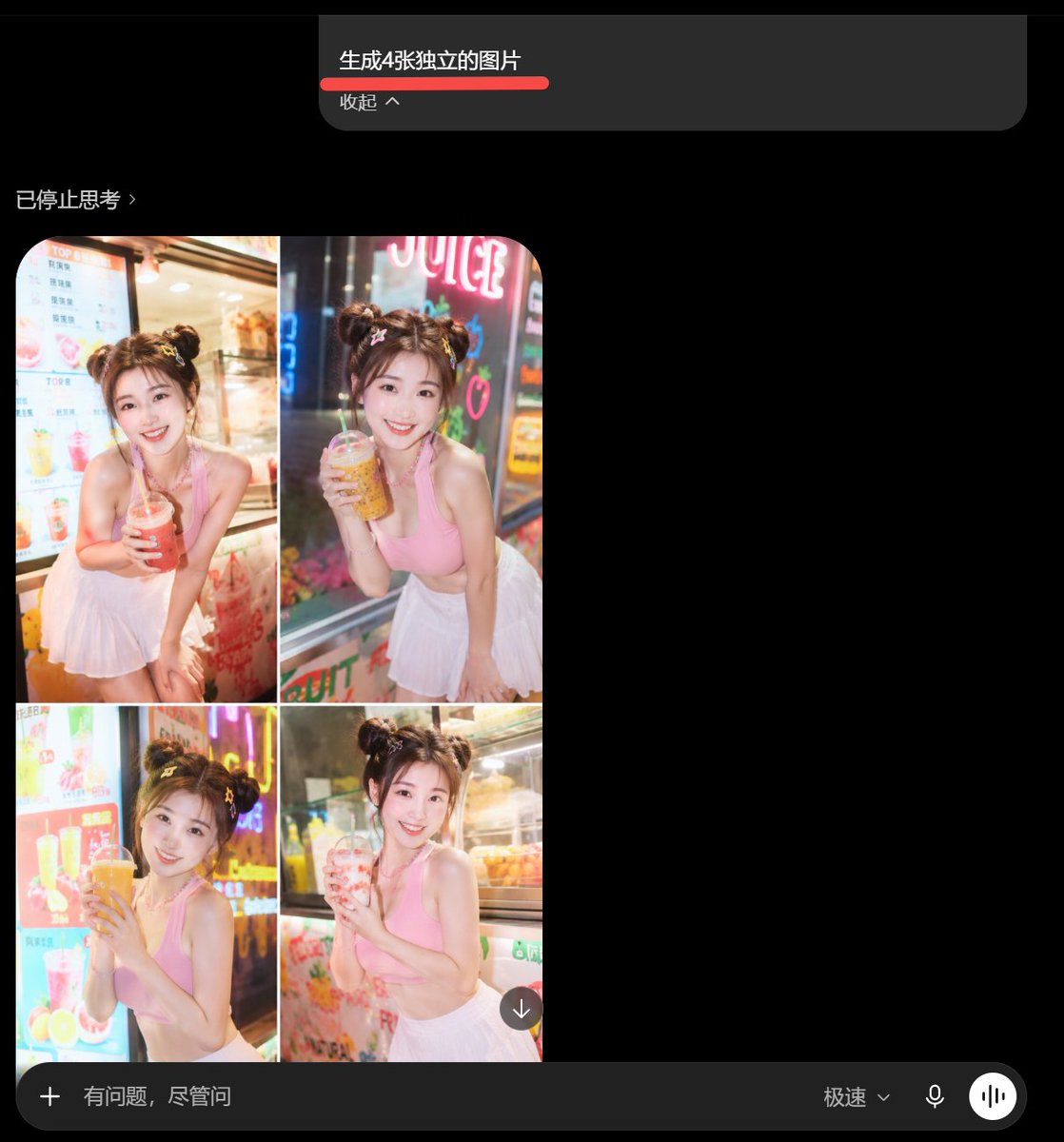
深色聊天 UI 与失败的 4 图拼贴效果
生成一张深色移动端 AI 聊天截图,展示请求生成四张独立图片却错误地生成为一张 2×2 果汁店照片拼贴的效果。
Goal: Create a dark-mode mobile chat screenshot showing an AI image generator response that incorrectly combines four requested images into one 2x2 collage.

Canvas: Square screenshot, approximately 768×768 px, black background, cropped like a smartphone app interface in dark mode.

Top prompt card: Near the top center, place a wide dark gray rounded rectangle message card. Inside it, show the Chinese prompt text {argument name="prompt text" default="生成4张独立的图片"} in white, with a thick red underline beneath it. Below that, show smaller gray text {argument name="collapse label" default="收起 ^"}. The card has a rounded lower-right corner and sits against empty black space.

Status line: On the left below the prompt card, add a small gray status label {argument name="status text" default="已停止思考 ›"}.

Main generated image area: Under the status line on the left, show exactly 1 rounded-corner generated image panel containing exactly 4 photo tiles arranged in a 2×2 grid, separated by thin white dividers. Each tile shows the same young woman in a bright beverage shop setting, but with slightly different pose and drink:
1. Top-left tile: smiling young woman with double-bun hairstyle, pink sleeveless crop top and white pleated skirt, leaning forward and holding a red iced drink with a straw, menu board behind her.
2. Top-right tile: same woman holding an amber bubble tea or juice drink, neon sign behind her, night street-shop lighting.
3. Bottom-left tile: same woman holding a large orange drink with both hands, colorful drink menu and neon lights behind her.
4. Bottom-right tile: same woman holding a pale pink drink, refrigerated display case behind her.
The woman should have fair skin, soft glam makeup, brown hair in two messy buns with small hair accessories, a cheerful expression, and a cute influencer-style pose. The photo style is glossy, overexposed, saturated, and slightly unrealistic, like an AI-generated social media portrait collage.

Overlay controls: Add one small circular download button with a downward arrow at the lower-right corner of the collage image.

Bottom input bar: Across the bottom, draw a long dark gray rounded input bar. It contains exactly 5 visible elements: a plus icon on the far left, placeholder text {argument name="input placeholder" default="有问题,尽管问"}, a speed mode label {argument name="speed mode label" default="极速⌄"}, a microphone icon, and a white circular voice-wave button on the far right.

Visual style: Preserve the look of a real mobile app screenshot: black empty negative space on the right, subtle gray UI text, rounded rectangles, clean sans-serif font, and slightly compressed screenshot quality. Do not create four separate files; the visual joke is that the four images are fused into one collage.
目标:创建一张深色模式的移动端聊天界面截图,展示 AI 图像生成结果未能生成四张独立图片,而是生成了一张 2×2 的拼贴图。
画布:方形截图,约 768×768 像素,黑色背景,具有移动端 App UI 的裁剪感。在结果的右侧和下方留出大面积黑色空白。
布局:在顶部居中位置,放置一个深灰色圆角提示气泡,内含中文指令文本“生成 4 张独立的图片”,下方带有粗红色下划线,再下方有一行较小的文字“收起 ^”。在左下方,显示一个中文状态标签“已停止思考 ›”。在其下方,放置一张生成的图片卡片,顶部圆角,包含 4 个排列成 2×2 网格的照片面板,由细白线分隔。在拼贴图的右下角重叠放置一个带有向下箭头的圆形下载按钮。在底部,显示一个横跨宽度的深色圆角输入栏:左侧为加号图标,占位符文本“有问题,尽管问”,右侧为模式文本“极速⌄”、麦克风图标以及一个白色圆形语音/均衡器按钮。
生成图像内容:单张生成的图片卡片必须包含 4 个面板:左上、右上、左下、右下。每个面板展示同一位年轻女性在夜晚明亮的果汁店或饮料摊前摆姿势,背景有温暖的店面灯光、霓虹灯招牌、色彩鲜艳的饮品菜单“项目”,以及浅景深的手机摄影质感。她身穿粉色无袖露脐上衣和白色百褶短裙,扎着两个可爱的丸子头。为了隐私,她的脸部被柔和的矩形模糊处理。在每个面板中,她拿着不同的塑料饮料杯并插着吸管,姿势略有不同:1) 左上,双手捧着一杯红色饮料放在胸前;2) 右上,身体前倾,在霓虹灯“JUICE”招牌旁拿着一杯黄色/橙色饮料靠近脸部;3) 左下,在明亮的菜单“项目”前,将一杯大杯橙色饮料靠近嘴边;4) 右下,站在玻璃展示柜旁,拿着一杯淡粉色饮料。主体应为 {argument name="character description" default="一位扎着两个丸子头、身穿粉色无袖露脐上衣和白色百褶短裙、脸部模糊的年轻女性"},拍摄地点为 {argument name="location" default="色彩鲜艳的夜间果汁店门前"}。
视觉风格:使整体截图看起来像真实的手机截屏,而非精修的样机。使用略微压缩的截图画质、霓虹灯的柔和光晕、拼贴图中写实的色彩以及极简的深色 UI 元素。顶部气泡中的中文指令应为 {argument name="command text" default="生成 4 张独立的图片"}。状态标签应为 {argument name="status text" default="已停止思考 ›"}。底部输入占位符应为 {argument name="input placeholder" default="有问题,尽管问"}。
约束:结果必须显示一张合并的 2×2 拼贴图,而不是四张独立的图片卡片。包含 4 个照片面板和 1 个下载图标。保留深色聊天界面、中文 UI 文本、红色下划线和底部输入栏。不要在生成的照片拼贴中添加额外的面板、额外的人员、水印或标题。