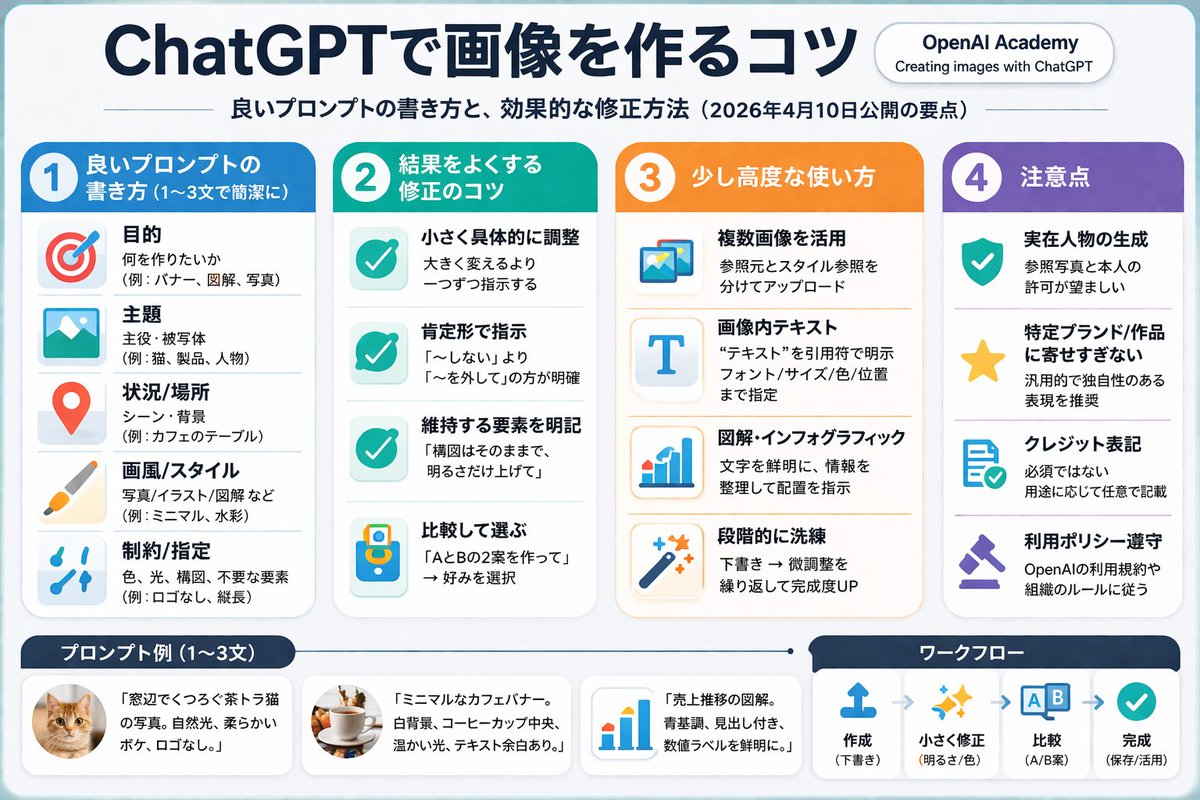
ChatGPT Image Generation Tips
一份结构化、多板块的信息图,概述了生成和编辑图像的最佳实践,包含图标、示例图形及分步提示。
{"type":"infographic","style":"clean, corporate, flat design, pastel accents, dark blue primary color","header":{"logo":"swirl icon","academy_name":"{argument name=\"academy name\" default=\"OpenAI Academy\"}","main_title":"{argument name=\"main title\" default=\"ChatGPTで画像を作る・直すための実践ガイド\"}","metadata":"date and page info","summary_box":{"title":"要点","content":"paragraph about key points"}},"layout":{"sections":[{"number":1,"title":"{argument name=\"section 1 title\" default=\"よい画像プロンプトの書き方\"}","layout":"two columns","left_column":{"count":6,"items":[{"icon":"target","label":"目的を明確に"},{"icon":"landscape","label":"主題・状況・場所を指定"},{"icon":"brush","label":"スタイル・雰囲気を指定"},{"icon":"sun","label":"光・質感・構図を指定"},{"icon":"prohibition","label":"制約・除外事項を明記"},{"icon":"pencil","label":"編集時は変更点と維持点を明確に"}]},"right_column":{"box_title":"良いプロンプト例","image":"{argument name=\"example image subject\" default=\"white mug on a wooden desk\"}"}},{"number":2,"title":"結果をよくするための段階的な修正","cards":{"count":4,"items":[{"icon":"sun","label":"明るさを調整"},{"icon":"palette","label":"色味を調整"},{"icon":"landscape","label":"背景を調整"},{"icon":"crop","label":"構図を維持"}]},"bottom_banner":"lightbulb icon with text"},{"number":3,"title":"少し踏み込んだ使い方","list":{"count":3,"items":[{"icon":"multiple images","label":"複数画像の活用"},{"icon":"text 'Te'","label":"画像内テキスト"},{"icon":"pie chart","label":"インフォグラフィック・図解"}]},"example_box":{"title":"テキスト指定の例","graphic":"green box with 'SPRING SALE'"}},{"number":4,"title":"追加の注意点","items":{"count":4,"items":[{"icon":"person","label":"実在人物の生成"},{"icon":"shield","label":"ブランド・作品名の使用"},{"icon":"id card","label":"クレジット表記"},{"icon":"checklist","label":"ポリシー遵守"}]}}],"footer":{"style":"dark blue banner","text":"{argument name=\"footer summary\" default=\"まとめ: 目的と制約を具体的に伝え、段階的に修正を重ねることで、より良い画像を生成できます。\"}"}}}{ "type": "infographic", "style": "clean, corporate, flat design, soft pastel colors, rounded corners, white background", "header": { "main_title": "{argument name=\"main title\" default=\"ChatGPTで画像を作るコツ\"}", "subtitle": "{argument name=\"subtitle\" default=\"良いプロンプトの書き方と、効果的な修正方法(2026年4月10日公開の要点)\"}", "top_right_badge": "OpenAI Academy / Creating images with ChatGPT" }, "layout": { "columns": [ { "color_theme": "blue", "header": "{argument name=\"column 1 title\" default=\"1 良いプロンプトの書き方 (1〜3文で簡潔に)\"}", "item_count": 5, "icons": ["target", "landscape picture", "map pin", "paintbrush", "sliders"] }, { "color_theme": "green", "header": "{argument name=\"column 2 title\" default=\"2 結果をよくする修正のコツ\"}", "item_count": 4, "icons": ["checkmark", "checkmark", "checkmark", "A/B comparison"] }, { "color_theme": "orange", "header": "3 少し高度な使い方", "item_count": 4, "icons": ["multiple images", "letter T", "bar chart", "magic wand"] }, { "color_theme": "purple", "header": "4 注意点", "item_count": 4, "icons": ["shield with check", "star", "document with check", "gavel"] } ], "footer": { "left_section": { "title": "{argument name=\"bottom left title\" default=\"プロンプト例 (1〜3文)\"}", "item_count": 3, "thumbnails": ["orange tabby cat", "coffee cup on white background", "blue bar chart"] }, "right_section": { "title": "ワークフロー", "step_count": 4, "icons": ["upload arrow", "sparkles", "A/B boxes", "checkmark"], "flow_style": "horizontal with dashed arrows" } } } }{"type":"infographic","style":"简洁、企业风、扁平化设计、柔和色调点缀、深蓝色主色调","header":{"logo":"漩涡图标","academy_name":"{argument name=\"academy name\" default=\"OpenAI Academy\"}","main_title":"{argument name=\"main title\" default=\"ChatGPT 图像生成与编辑实践指南\"}","metadata":"日期和页面信息","summary_box":{"title":"要点","content":"关于关键点的段落"}},"layout":{"sections":[{"number":1,"title":"{argument name=\"section 1 title\" default=\"如何编写优质图像提示词\"}","layout":"双栏","left_column":{"count":6,"items":[{"icon":"target","label":"明确目标"},{"icon":"landscape","label":"指定主题、场景和地点"},{"icon":"brush","label":"指定风格和氛围"},{"icon":"sun","label":"指定光影、质感和构图"},{"icon":"prohibition","label":"明确约束条件和排除项"},{"icon":"pencil","label":"编辑时明确变更点与保留点"}]},"right_column":{"box_title":"优质提示词示例","image":"{argument name=\"example image subject\" default=\"木桌上的白色马克杯\"}"}},{"number":2,"title":"优化结果的分步修正方法","cards":{"count":4,"items":[{"icon":"sun","label":"调整亮度"},{"icon":"palette","label":"调整色调"},{"icon":"landscape","label":"调整背景"},{"icon":"crop","label":"保持构图"}]},"bottom_banner":"灯泡图标及文本"},{"number":3,"title":"进阶使用技巧","list":{"count":3,"items":[{"icon":"multiple images","label":"多图活用"},{"icon":"text 'Te'","label":"图像内文本"},{"icon":"pie chart","label":"信息图与图解"}]},"example_box":{"title":"文本指定示例","graphic":"带有 'SPRING SALE' 的绿色方框"}},{"number":4,"title":"其他注意事项","items":{"count":4,"items":[{"icon":"person","label":"生成真实人物"},{"icon":"shield","label":"品牌与作品名称的使用"},{"icon":"id card","label":"版权标注"},{"icon":"checklist","label":"政策合规"}]}}],"footer":{"style":"深蓝色横幅","text":"{argument name=\"footer summary\" default=\"总结:通过具体传达目标与约束条件,并进行分步修正,可以生成更高质量的图像。\"}"}}{ "type": "인포그래픽", "style": "깔끔하고, 기업적이며, 플랫 디자인, 부드러운 파스텔 색상, 둥근 모서리, 흰색 배경", "header": { "main_title": "{argument name=\"main title\" default=\"ChatGPT 이미지 생성 팁\"}", "subtitle": "{argument name=\"subtitle\" default=\"좋은 프롬프트 작성법과 효과적인 수정 방법 (2026년 4월 10일 공개된 요점)\"}", "top_right_badge": "OpenAI Academy / Creating images with ChatGPT" }, "layout": { "columns": [ { "color_theme": "blue", "header": "{argument name=\"column 1 title\" default=\"1 좋은 프롬프트 작성법 (1~3문장으로 간결하게)\"}", "item_count": 5, "icons": ["target", "landscape picture", "map pin", "paintbrush", "sliders"] }, { "color_theme": "green", "header": "{argument name=\"column 2 title\" default=\"2 결과를 향상시키는 수정 팁\"}", "item_count": 4, "icons": ["checkmark", "checkmark", "checkmark", "A/B comparison"] }, { "color_theme": "orange", "header": "3 약간 고급 사용법", "item_count": 4, "icons": ["multiple images", "letter T", "bar chart", "magic wand"] }, { "color_theme": "purple", "header": "4 주의 사항", "item_count": 4, "icons": ["shield with check", "star", "document with check", "gavel"] } ], "footer": { "left_section": { "title": "{argument name=\"bottom left title\" default=\"프롬프트 예시 (1~3문장)\"}", "item_count": 3, "thumbnails": ["orange tabby cat", "coffee cup on white background", "blue bar chart"] }, "right_section": { "title": "워크플로우", "step_count": 4, "icons": ["upload arrow", "sparkles", "A/B boxes", "checkmark"], "flow_style": "horizontal with dashed arrows" } } } }