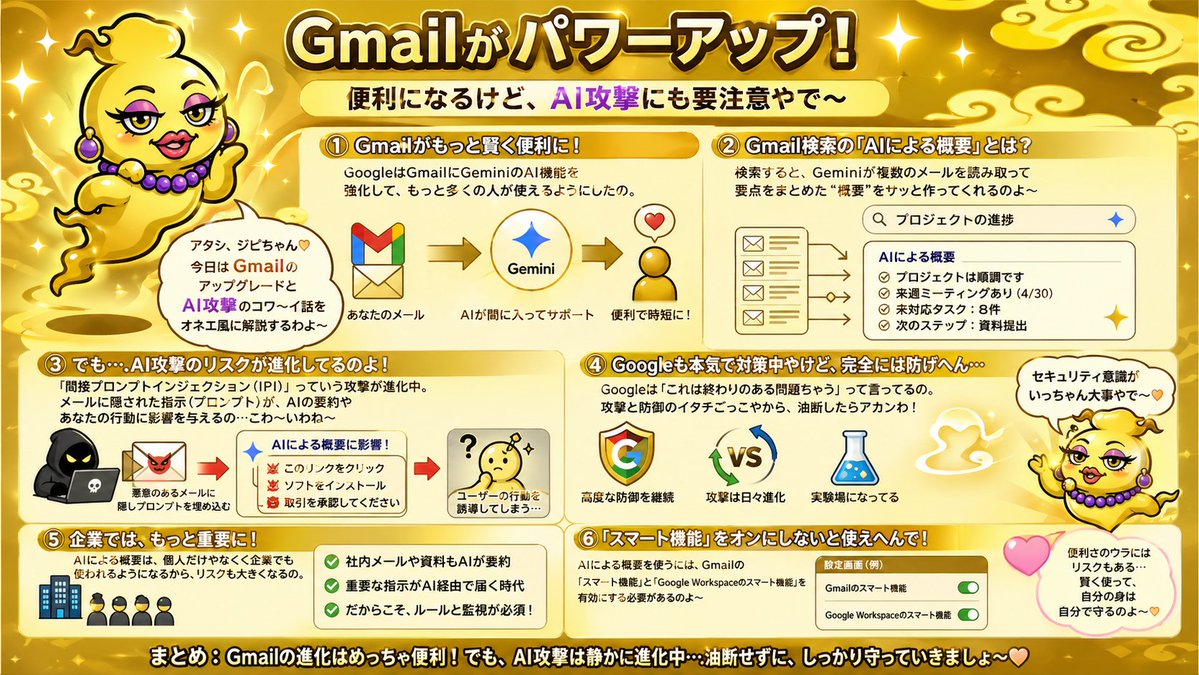
金色 Gmail AI 风险信息图
一张华丽的日式信息图海报,解释了 Gmail AI 升级、Gemini 摘要以及相关的安全风险,适用于社交媒体帖子、Slides 演示或博客摘要。
{"type":"Japanese infographic poster","topic":"Gmail feature upgrades and AI security risks","style":"bright playful educational explainer, glossy gold theme, high-contrast Japanese TV variety-show graphic design, thick outlined text, rounded boxes, sparkles, soft gradients, cute warning visuals","aspect_ratio":"16:9","language":"Japanese","background":{"base_color":"metallic gold","details":["glowing sparkles scattered across the whole image","stylized pale gold cloud swirls in the corners and top area","soft radial highlights","warm shiny gradient backdrop"]},"headline":{"text":"{argument name=\"headline text\" default=\"Gmailがパワーアップ!\"}","position":"top center","style":"very large bold Japanese display text, white to pale yellow fill, thick dark brown outline, bright glow"},"subheadline":{"text":"便利になるけど、AI攻撃にも要注意やで〜","position":"below headline center","style":"bold Japanese text on a pale yellow rounded banner, with AI攻撃 in vivid purple"},"mascot":{"count":2,"description":"a cute floating genie character in a shiny gold lamp-spirit body with no legs, round yellow face, tiny curl of hair, purple earrings and purple bead necklace, expressive hands, outlined in black, speaking in an onee-style Kansai vibe","placements":[{"position":"upper left","pose":"floating beside the title, one hand raised, with a speech bubble"},{"position":"right side lower-middle","pose":"floating near sections 4 and 6, one arm raised, with a speech bubble and pink heart nearby"}],"speech_bubbles":["アタシ、ジビちゃん♡ 今日は GmailのアップデートとAI攻撃のコワ〜イ話をオネエ風に解説するわよ〜","セキュリティ意識がいっちゃん大事やで〜"]},"layout":{"sections":[{"title":"① Gmailがもっと賢く便利に!","position":"upper left","count":1,"contents":["short explanation about Google strengthening Gemini AI features in Gmail so more people can use it","3-step visual flow: Gmail logo -> Gemini star logo -> happy convenience icon with heart","small labels: あなたのメール / AIが間に入ってサポート / 便利で時短に!"]},{"title":"② Gmail検索の『AIによる概要』とは?","position":"upper right","count":1,"contents":["description that Gemini reads multiple emails from search results and quickly creates a summary","search bar mockup with the query プロジェクトの進捗","left side stack of 4 email icons/cards","right side summary panel titled AIによる概要","4 bullet items in the summary: プロジェクトは順調です / 来週ミーティングあり(4/30) / 未対応タスク:8件 / 次のステップ:資料提出"]},{"title":"③ でも…AI攻撃のリスクが進化してるのよ!","position":"middle left","count":1,"contents":["warning text about prompt injection attacks hidden in emails and documents influencing AI summaries and affecting user behavior","left visual of a hooded hacker with a laptop and a malicious email icon","center summary box titled AIによる概要に影響!","3 warning bullets with red demon icons: このリンクをクリック / ソフトをインストール / 取引を承認してください","right visual of a confused yellow face with a question mark","caption: ユーザーの行動を誘導してしまう…"]},{"title":"④ Googleも本気で対策中やけど、完全には防げへん…","position":"middle right","count":1,"contents":["text explaining Google says this is an ongoing problem, so both attackers and defenders keep evolving and users should not let their guard down","3 main icons: Google G logo / VS with rotating blue and green arrows / laboratory flask","captions: 高度な防御を継続 / 攻撃は日々進化 / 実験場になってる"]},{"title":"⑤ 企業では、もっと大きな課題に!","position":"lower left","count":1,"contents":["text stating that AI summaries will be used not only by individuals but also by companies, increasing the risk","small icon row of 1 office building and 4 businesspeople","green checklist panel with 3 check items: 社内メールや資料もAIが要約 / 重要な指示がAI経由で届く時代 / だからこそ、ルールと監視が必須!"]},{"title":"⑥ 『スマート機能』をオンにしないと使えへんで!","position":"lower right","count":1,"contents":["text explaining that to use AI summaries, Gmail smart features and Google Workspace smart features must be enabled","settings card labeled 設定画面(例)","2 toggle rows: Gmailのスマート機能 / Google Workspaceのスマート機能","both toggles shown in green and switched on","nearby pink heart and a rounded note bubble saying: 便利のウラにはリスクもある… 賢く使って、自分の身は自分で守るのよ〜♡"]}],"footer":{"text":"まとめ:Gmailの進化はめっちゃ便利!でも、AI攻撃は静かに進化中…油断せずに、しっかり守っていきましょ〜♡","position":"bottom full width","style":"large bold white Japanese text with thick black outline on a dark gold strip"}},"visual_counts":{"numbered_sections":6,"speech_bubbles":3,"heart_icons":3,"toggle_switches":2,"main_flow_arrows_in_section_1":2,"email_icons_in_section_2":4,"summary_bullets_in_section_2":4,"warning_bullets_in_section_3":3,"checkmarks_in_section_5":3},"render_notes":"Keep everything in a single flat infographic composition with rounded cream panels and orange-gold headers. Emphasize readability, cute-but-urgent tone, and comedic personality. Use Japanese text exactly as shown, with bold outlines and clear hierarchy. The mascot should feel charming and talkative, floating as if made of lamp smoke rather than walking."}{"type":"日式信息图海报","topic":"Gmail 功能升级与 AI 安全风险","style":"明亮、俏皮、教育性解说风格,光泽金色主题,高对比度日式电视综艺节目图形设计,粗轮廓文字,圆角边框,闪光效果,柔和渐变,可爱的警告视觉元素","aspect_ratio":"16:9","language":"日语","background":{"base_color":"金属金","details":["整个图像散布着发光的闪光","角落和顶部区域有风格化的淡金色云朵漩涡","柔和的径向高光","温暖的闪亮渐变背景"]},"headline":{"text":"{argument name=\"headline text\" default=\"Gmail 升级啦!\"}","position":"顶部居中","style":"超大号粗体日文标题文字,白色至淡黄色填充,深棕色粗轮廓,明亮发光效果"},"subheadline":{"text":"虽然变方便了,但也要小心 AI 攻击哦~","position":"标题下方居中","style":"淡黄色圆角横幅上的粗体日文,其中“AI 攻击”采用鲜艳的紫色"},"mascot":{"count":2,"description":"一个可爱的漂浮精灵角色,有着闪亮的金色神灯精灵身体,没有腿,圆圆的黄色脸庞,一小撮卷发,紫色耳环和紫色珠子项链,表情丰富的手部动作,黑色轮廓,用关西腔的“姐姐”语气说话","placements":[{"position":"左上角","pose":"漂浮在标题旁边,一只手举起,带有对话气泡"},{"position":"右侧中下方","pose":"漂浮在第 4 和第 6 部分附近,一只手臂举起,旁边有对话气泡和粉色爱心"}],"speech_bubbles":["我是 Gigi 酱♡ 今天要用姐姐的口吻来给你们讲解 Gmail 的更新和 AI 攻击的可怕故事哦~","安全意识才是最重要的哟~"]},"layout":{"sections":[{"title":"① Gmail 变得更聪明、更方便了!","position":"左上角","count":1,"contents":["关于 Google 加强 Gmail 中 Gemini AI 功能的简短说明,让更多人可以使用","3 步视觉流程:Gmail Logo -> Gemini 星形 Logo -> 带有爱心的快乐便利图标","小标签:你的邮件 / AI 介入提供支持 / 便捷又省时!"]},{"title":"② Gmail 搜索中的“AI 摘要”是什么?","position":"右上角","count":1,"contents":["描述 Gemini 如何读取搜索结果中的多封邮件并快速生成摘要","搜索栏样机,查询内容为“项目进度”","左侧堆叠 4 个邮件图标/卡片","右侧摘要面板,标题为“AI 摘要”","摘要中的 4 个要点:项目进展顺利 / 下周有会议(4/30) / 未处理任务:8 项 / 下一步:提交资料"]},{"title":"③ 但是……AI 攻击的风险也在进化!","position":"左中","count":1,"contents":["关于隐藏在邮件和文档中影响 AI 摘要并诱导用户行为的提示词注入攻击的警告文字","左侧视觉:带着笔记本电脑的连帽黑客和恶意邮件图标","中心摘要框,标题为“影响 AI 摘要!”","带有红色恶魔图标的 3 个警告要点:点击此链接 / 安装软件 / 请批准交易","右侧视觉:一个带有问号的困惑黄色脸庞","说明:诱导用户采取行动……"]},{"title":"④ Google 虽然也在认真应对,但无法完全防御……","position":"右中","count":1,"contents":["解释 Google 表示这是一个持续存在的问题,攻击者和防御者都在不断进化,用户切勿掉以轻心","3 个主要图标:Google G Logo / 带有旋转蓝绿色箭头的 VS / 实验室烧瓶","说明:持续进行高级防御 / 攻击日益进化 / 成为实验场"]},{"title":"⑤ 在企业中,这成了更大的课题!","position":"左下","count":1,"contents":["说明 AI 摘要不仅会被个人使用,也会被企业使用,从而增加了风险","1 座办公楼和 4 名商务人士的小图标行","带有 3 个勾选项的绿色清单面板:AI 摘要内部邮件和资料 / 通过 AI 接收重要指令的时代 / 正因如此,规则和监控必不可少!"]},{"title":"⑥ 不开启“智能功能”就用不了哦!","position":"右下","count":1,"contents":["解释要使用 AI 摘要,必须启用 Gmail 智能功能和 Google Workspace 智能功能","标记为“设置界面(示例)”的设置卡片","2 行开关:Gmail 智能功能 / Google Workspace 智能功能","两个开关均显示为绿色并已开启","旁边有粉色爱心和一个圆角便签气泡,写着:便利背后也有风险……要聪明地使用,保护好自己哦~♡"]}],"footer":{"text":"总结:Gmail 的进化非常方便!但 AI 攻击也在悄悄进化……千万别大意,一定要好好保护自己哦~♡","position":"底部全宽","style":"深金色条带上的大型粗体白色日文,带有黑色粗轮廓"}},"visual_counts":{"numbered_sections":6,"speech_bubbles":3,"heart_icons":3,"toggle_switches":2,"main_flow_arrows_in_section_1":2,"email_icons_in_section_2":4,"summary_bullets_in_section_2":4,"warning_bullets_in_section_3":3,"checkmarks_in_section_5":3},"render_notes":"保持整体为单张平面的信息图构图,使用圆角奶油色面板和橙金色标题。强调可读性、可爱但紧迫的语气以及喜剧性的人格化特征。完全按照所示使用日文,并带有粗轮廓和清晰的层级。吉祥物应感觉迷人且健谈,漂浮时看起来像是由灯烟组成,而不是在行走。"}