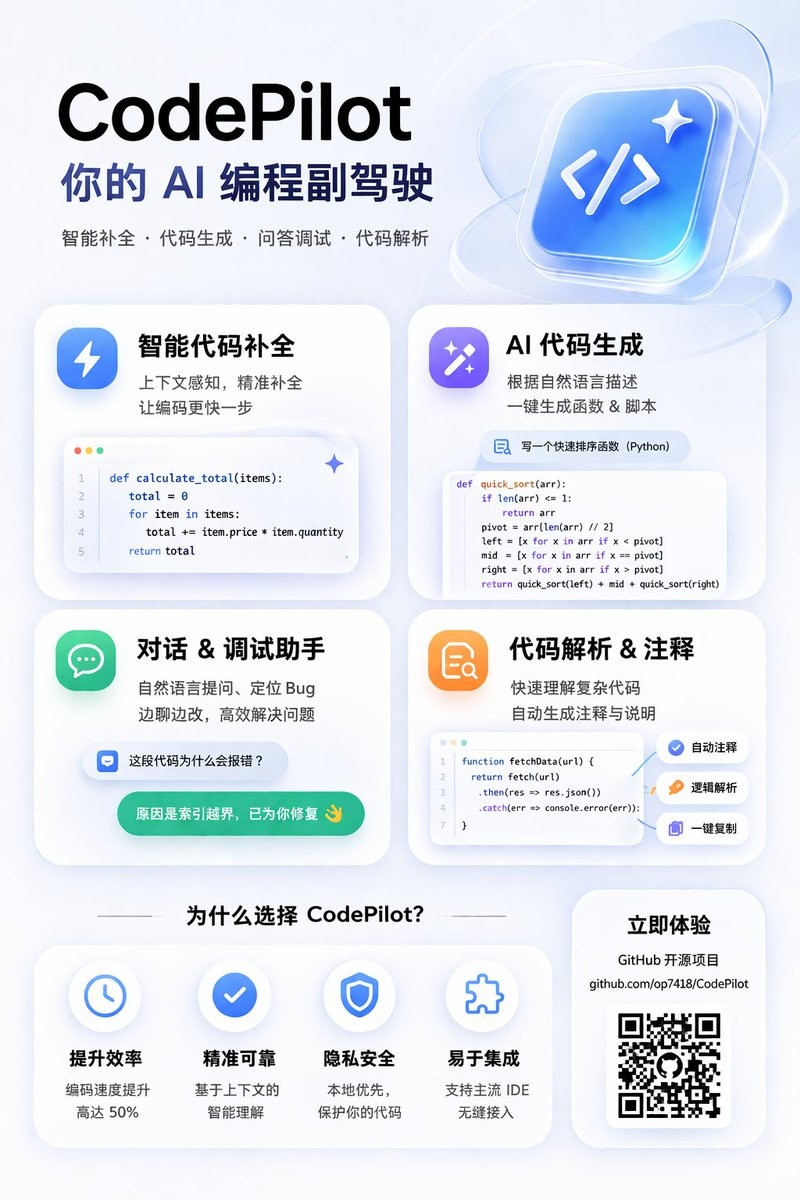
AI Programming Assistant Infographic
为一款 AI 编程工具生成现代感十足的磨砂玻璃风格宣传海报,包含一个 2x2 的功能卡片网格(展示代码片段)以及一个优势说明板块。
{
  "type": "app promotional infographic poster",
  "style": "clean, modern, glassmorphism, soft shadows, 3D icons",
  "theme": "{argument name=\"primary color theme\" default=\"blue and white\"}",
  "header": {
    "title": "{argument name=\"app name\" default=\"CodePilot\"}",
    "subtitle": "{argument name=\"subtitle\" default=\"你的 AI 编程副驾驶\"}",
    "features_list": "智能补全 · 代码生成 · 问答调试 · 代码解析",
    "main_icon": "glossy 3D rounded square, blue gradient, white {argument name=\"main icon symbol\" default=\"</>\"} and sparkles"
  },
  "layout": {
    "sections": [
      {
        "title": "feature_cards",
        "position": "middle grid",
        "count": 4,
        "items": [
          {
            "label": "智能代码补全",
            "icon": "blue lightning bolt",
            "description": "上下文感知, 精准补全 让编码更快一步",
            "ui_element": "macOS style code window with Python calculate_total function"
          },
          {
            "label": "AI 代码生成",
            "icon": "purple magic wand",
            "description": "根据自然语言描述 一键生成函数 & 脚本",
            "ui_element": "chat prompt bubble and code window with Python quick_sort function"
          },
          {
            "label": "对话 & 调试助手",
            "icon": "green chat bubble",
            "description": "自然语言提问、定位 Bug 边聊边改, 高效解决问题",
            "ui_element": "chat interface with user question and green AI resolution bubble"
          },
          {
            "label": "代码解析 & 注释",
            "icon": "orange document with magnifying glass",
            "description": "快速理解复杂代码 自动生成注释与说明",
            "ui_element": "code window with JS fetchData function and 3 floating action tags: 自动注释, 逻辑解析, 一键复制"
          }
        ]
      },
      {
        "title": "为什么选择 CodePilot?",
        "position": "bottom left",
        "count": 4,
        "labels": ["提升效率", "精准可靠", "隐私安全", "易于集成"],
        "icons": ["clock", "checkmark", "shield", "puzzle piece"]
      },
      {
        "title": "立即体验",
        "position": "bottom right",
        "count": 1,
        "elements": ["GitHub 开源项目", "{argument name=\"github link\" default=\"github.com/op7418/CodePilot\"}", "QR code"]
      }
    ]
  }
}
{
"type": "应用宣传信息图海报",
"style": "简洁、现代、磨砂玻璃风格、柔和阴影、3D 图标",
"theme": "{argument name=\"primary color theme\" default=\"蓝白配色\"}",
"header": {
"title": "{argument name=\"app name\" default=\"CodePilot\"}",
"subtitle": "{argument name=\"subtitle\" default=\"你的 AI 编程副驾驶\"}",
"features_list": "智能补全 · 代码生成 · 问答调试 · 代码解析",
"main_icon": "光泽感 3D 圆角正方形,蓝色渐变,白色 {argument name=\"main icon symbol\" default=\"</>\"} 及闪光效果"
},
"layout": {
"sections": [
{
"title": "feature_cards",
"position": "中间网格",
"count": 4,
"items": [
{
"label": "智能代码补全",
"icon": "蓝色闪电",
"description": "上下文感知,精准补全,让编码快人一步",
"ui_element": "macOS 风格代码窗口,展示 Python calculate_total 函数"
},
{
"label": "AI 代码生成",
"icon": "紫色魔法棒",
"description": "根据自然语言描述,一键生成函数与脚本",
"ui_element": "聊天提示气泡和展示 Python quick_sort 函数的代码窗口"
},
{
"label": "对话 & 调试助手",
"icon": "绿色聊天气泡",
"description": "通过自然语言提问定位 Bug,边聊边改,高效解决问题",
"ui_element": "包含用户提问和绿色 AI 解决方案气泡的聊天界面"
},
{
"label": "代码解析 & 注释",
"icon": "带有放大镜的橙色文档",
"description": "快速理解复杂代码,自动生成注释与说明",
"ui_element": "展示 JS fetchData 函数的代码窗口,带有 3 个浮动操作标签:自动注释、逻辑解析、一键复制"
}
]
},
{
"title": "为什么选择 CodePilot?",
"position": "左下角",
"count": 4,
"labels": ["提升效率", "精准可靠", "隐私安全", "易于集成"],
"icons": ["时钟", "对勾", "盾牌", "拼图块"]
},
{
"title": "立即体验",
"position": "右下角",
"count": 1,
"elements": ["GitHub 开源项目", "{argument name=\"github link\" default=\"github.com/op7418/CodePilot\"}", "二维码"]
}
]
}
}{
"type": "앱 프로모션 인포그래픽 포스터",
"style": "깔끔하고 현대적인 유리 모프, 부드러운 그림자, 3D 아이콘",
"theme": "{argument name=\"primary color theme\" default=\"파란색과 흰색\"}",
"header": {
"title": "{argument name=\"app name\" default=\"CodePilot\"}",
"subtitle": "{argument name=\"subtitle\" default=\"당신의 AI 프로그래밍 부조종사\"}",
"features_list": "스마트 완성 · 코드 생성 · Q&A 디버깅 · 코드 분석",
"main_icon": "광택 있는 3D 둥근 정사각형, 파란색 그라데이션, 흰색 {argument name=\"main icon symbol\" default=\"</>\"} 및 반짝임"
},
"layout": {
"sections": [
{
"title": "feature_cards",
"position": "중앙 그리드",
"count": 4,
"items": [
{
"label": "스마트 코드 완성",
"icon": "파란색 번개",
"description": "맥락 인식, 정확한 완성으로 코딩을 더 빠르게",
"ui_element": "macOS 스타일 코드 창에 Python calculate_total 함수"
},
{
"label": "AI 코드 생성",
"icon": "보라색 마법 지팡이",
"description": "자연어 설명에 따라 원클릭으로 함수 및 스크립트 생성",
"ui_element": "채팅 프롬프트 버블과 Python quick_sort 함수를 보여주는 코드 창"
},
{
"label": "대화 & 디버깅 도우미",
"icon": "녹색 채팅 버블",
"description": "자연어로 질문하고 버그를 찾고 대화하며 수정, 효율적으로 문제 해결",
"ui_element": "사용자 질문과 녹색 AI 해결 버블이 포함된 채팅 인터페이스"
},
{
"label": "코드 분석 & 주석",
"icon": "확대경이 있는 주황색 문서",
"description": "복잡한 코드를 빠르게 이해하고 자동으로 주석 및 설명 생성",
"ui_element": "JS fetchData 함수를 보여주는 코드 창과 3개의 플로팅 작업 태그: 자동 주석, 논리 분석, 원클릭 복사"
}
]
},
{
"title": "왜 CodePilot을 선택해야 할까요?",
"position": "왼쪽 아래",
"count": 4,
"labels": ["효율성 향상", "정확하고 신뢰할 수 있음", "프라이버시 보호", "통합 용이"],
"icons": ["시계", "체크마크", "방패", "퍼즐 조각"]
},
{
"title": "지금 체험하기",
"position": "오른쪽 아래",
"count": 1,
"elements": ["GitHub 오픈 소스 프로젝트", "{argument name=\"github link\" default=\"github.com/op7418/CodePilot\"}", "QR 코드"]
}
]
}
}