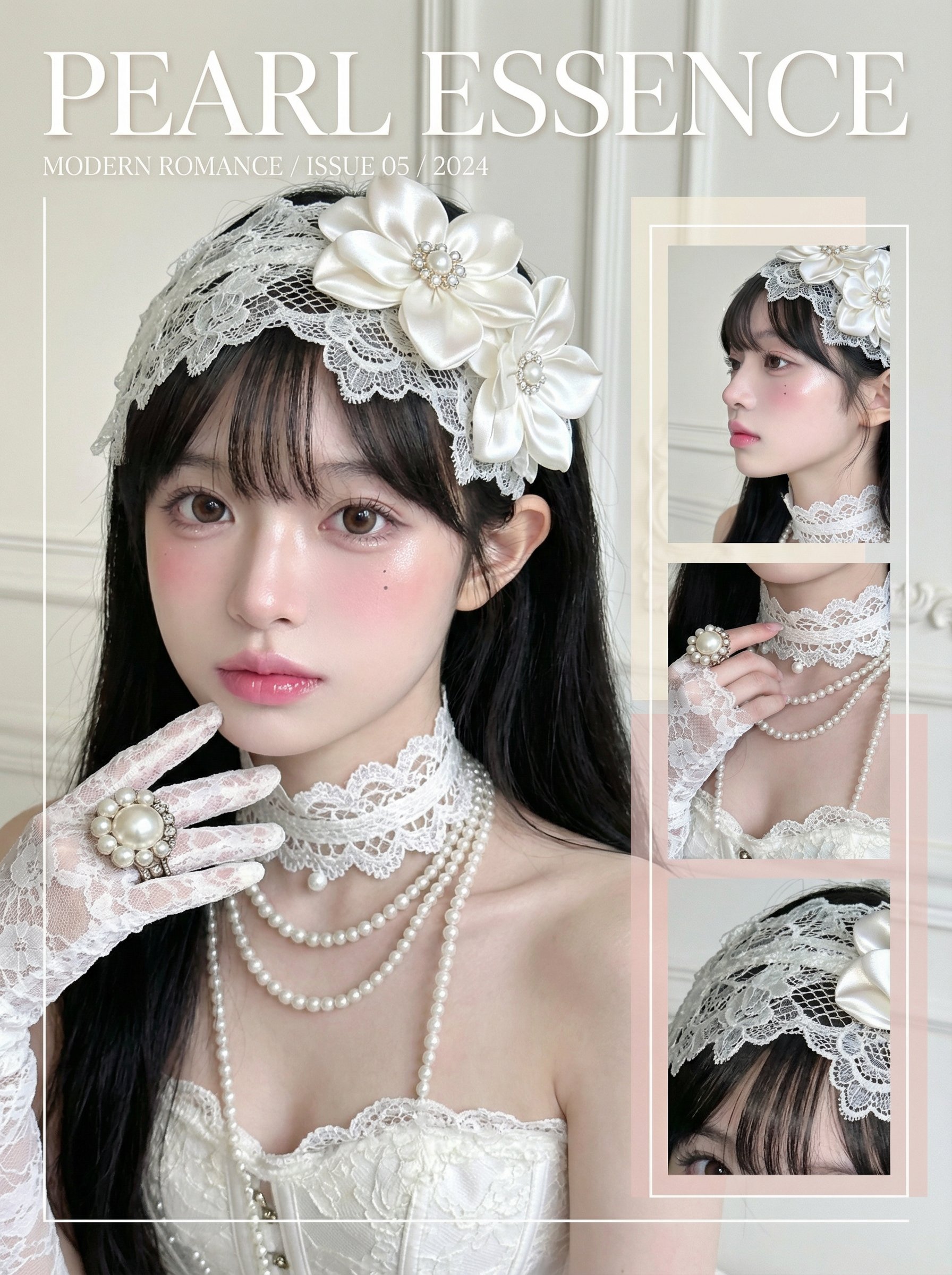
I. Overall Objectives
1. Function Description: Based on the user-uploaded reference portrait, extract the subject's temperament, makeup style, lighting, and color characteristics to create a unique fashion portrait collage masterpiece.
2. Variation Requirements: Retain the facial structure and overall temperament of the reference subject without directly copying the original image. Make creative variations in makeup and composition within the same stylistic framework.

II. Input Reference Image Requirements
1. Reference Content: Clear front-facing or three-quarter side-facing portrait photo, with visible facial features, skin texture, and general lighting atmosphere.
2. Extraction Points: Read from the reference image the skin tone, makeup intensity, dominant color palette, lighting direction, subject's temperament, and clothing color scheme.

III. Composition and Output Format
1. Main Image: Generate an ultra-close-up or close-up of the subject's face, with the head and shoulders occupying most of the frame. The gaze can be designed based on the original image's temperament.
2. Collage Structure: Add multiple small image collages on the right side or in a corner, which may include side profile close-ups, hand close-ups, or makeup detail close-ups, creating a magazine layout feel.
3. Background Style: Keep the background clean and simple, using solid colors or subtle brightness gradients to highlight the subject and makeup.

IV. Text and Graphic Design
1. Title Text: Place a large magazine title at the top of the image, using a simple and powerful font, aligned centrally or top-center.
2. Subtitle and Small Text: Add a few lines of small text on one side or at the bottom of the image, containing theme words, the subject's name, or dates, arranged neatly with uniform font size.
3. Geometric Shapes: Incorporate thin lines, narrow rectangular color blocks, or semi-transparent color blocks around the subject, combined with text to enhance the sense of graphic composition.

V. Style Inheritance Rules
1. Color Inheritance: The overall color tone, contrast, and warm/cool temperament should closely align with the reference image's style. The dominant color should come from the most prominent makeup or clothing color in the reference image.
2. Lighting Inheritance: Refer to the lighting direction and softness of the original image. If the original uses soft light, maintain a soft light texture; if the original has strong contrast, retain a certain degree of sharpness.
3. Makeup Inheritance: Based on the makeup characteristics of the reference image (e.g., sheer, bold, experimental, natural), maintain the same style level while making detailed variations in eye makeup, blush, and lip color.
4. Atmosphere Inheritance: Continue the emotional atmosphere of the reference image, such as coolness, sweetness, rebelliousness, or mystery, and reflect it in the expression and posture.

VI. Creative Variation Rules
1. Makeup Variations: Add localized exaggerated treatments based on the reference style, such as expanding the blush area, enhancing lip smudging, or adding freckles or highlight points.
2. Composition Variations: Adjust the facial angle, cropping range, and small collage positions to ensure each generation has a different composition.
3. Accessory Variations: Add simple yet stylish accessories to the neck, ears, or hands, echoing the dominant color palette without directly copying the reference image.
4. Detail Gestures: Incorporate hand movements such as touching the lips, cheeks, or under the eyes to add a sense of storytelling and engagement to the image.

VII. Overall Texture and Post-Processing Style
1. Clarity: Maintain visible skin pores and details, avoiding excessive skin smoothing while appropriately softening non-focal areas.
2. Color Tone Processing: Unify the overall color tone, moderately reduce cluttered colors, and only enhance the dominant color and a few accent colors.
3. Emotional Expression: Based on the reference image's temperament, control the intensity of the expression and gaze, ensuring the image retains the original style while showcasing independent personality.

Refer to the user-uploaded portrait photo and automatically read the image style according to the above rules for creation.
I. 전체 목표
1. 기능 설명: 사용자가 업로드한 참고 초상화를 기반으로 피사체의 기질, 메이크업 스타일, 조명 및 색상 특성을 추출하여 독특한 패션 초상화 콜라주 걸작을 제작합니다.
2. 변형 요구사항: 참고 피사체의 얼굴 구조와 전체 기질을 유지하면서 원본 이미지를 직접 복사하지 않습니다. 동일한 스타일적 틀 내에서 메이크업과 구성에 창의적인 변화를 줍니다.

II. 입력 참고 이미지 요구사항
1. 참고 내용: 얼굴 특징, 피부 질감, 일반적인 조명 분위기가 보이는 정면 또는 3/4 측면 초상화 사진.
2. 추출 포인트: 참고 이미지에서 피부 톤, 메이크업 강도, 주요 색상 팔레트, 조명 방향, 피사체의 기질 및 의상 색상 계획을 읽어냅니다.

III. 구성 및 출력 형식
1. 메인 이미지: 피사체의 얼굴을 초근접 또는 근접 촬영하여 머리와 어깨가 프레임 대부분을 차지하도록 생성합니다. 시선은 원본 이미지의 기질에 따라 디자인할 수 있습니다.
2. 콜라주 구조: 오른쪽 또는 구석에 여러 작은 이미지 콜라주를 추가하여 측면 프로필 근접, 손 근접 또는 메이크업 세부 근접을 포함하여 잡지 레이아웃 느낌을 만듭니다.
3. 배경 스타일: 배경을 깨끗하고 단순하게 유지하며, 단색 또는 미세한 밝기 그라데이션을 사용하여 피사체와 메이크업을 강조합니다.

IV. 텍스트 및 그래픽 디자인
1. 제목 텍스트: 이미지 상단에 큰 잡지 제목을 간단하고 강력한 폰트로 중앙 또는 상단 중앙에 배치합니다.
2. 부제목 및 작은 텍스트: 이미지 한쪽 또는 하단에 테마 단어, 피사체 이름 또는 날짜를 포함한 몇 줄의 작은 텍스트를 추가하여 균일한 폰트 크기로 깔끔하게 배열합니다.
3. 기하학적 형태: 얇은 선, 좁은 직사각형 색상 블록 또는 반투명 색상 블록을 피사체 주위에 통합하여 그래픽 구성을 향상시킵니다.

V. 스타일 상속 규칙
1. 색상 상속: 전체 색조, 대비 및 온/냉 기질이 참고 이미지의 스타일과 밀접하게 일치해야 합니다. 주요 색상은 참고 이미지에서 가장 두드러진 메이크업 또는 의상 색상에서 가져옵니다.
2. 조명 상속: 원본 이미지의 조명 방향과 부드러움을 참조합니다. 원본이 부드러운 조명을 사용하면 부드러운 조명 질감을 유지하고, 원본이 강한 대비를 가지면 일정한 날카로움을 유지합니다.
3. 메이크업 상속: 참고 이미지의 메이크업 특성(예: 투명, 대담, 실험적, 자연스러움)을 기반으로 동일한 스타일 수준을 유지하면서 아이 메이크업, 블러셔 및 립 컬러에 세부 변화를 줍니다.
4. 분위기 상속: 참고 이미지의 감정적 분위기(예: 차가움, 달콤함, 반항적임, 신비로움)를 계속 유지하고 이를 표현과 자세에 반영합니다.

VI. 창의적 변형 규칙
1. 메이크업 변형: 참고 스타일을 기반으로 블러셔 영역 확장, 립 스머징 강화, 주근깨 또는 하이라이트 포인트 추가 등 국소적으로 과장된 처리를 추가합니다.
2. 구성 변형: 얼굴 각도, 자르기 범위 및 작은 콜라주 위치를 조정하여 각 생성물이 다른 구성을 갖도록 합니다.
3. 액세서리 변형: 목, 귀 또는 손에 간단하면서도 스타일리시한 액세서리를 추가하여 주요 색상 팔레트와 어울리게 하되 참고 이미지를 직접 복사하지 않습니다.
4. 세부 제스처: 입술, 볼 또는 눈 아래를 만지는 손 동작을 포함하여 이미지에 스토리텔링과 참여감을 더합니다.

VII. 전체 질감 및 후처리 스타일
1. 선명도: 과도한 피부 매끄러움을 피하면서 적절히 비초점 영역을 부드럽게 하여 피부 모공 및 세부 사항을 유지합니다.
2. 색조 처리: 전체 색조를 통일하고, 어수선한 색상을 적당히 줄이며, 주요 색상과 몇 가지 강조 색상만을 강화합니다.
3. 감정 표현: 참고 이미지의 기질을 기반으로 표현과 시선의 강도를 조절하여 이미지가 원래 스타일을 유지하면서 독립적인 개성을 보여줍니다.

사용자가 업로드한 초상화 사진을 참조하여 위의 규칙에 따라 이미지 스타일을 자동으로 읽고 창작합니다.