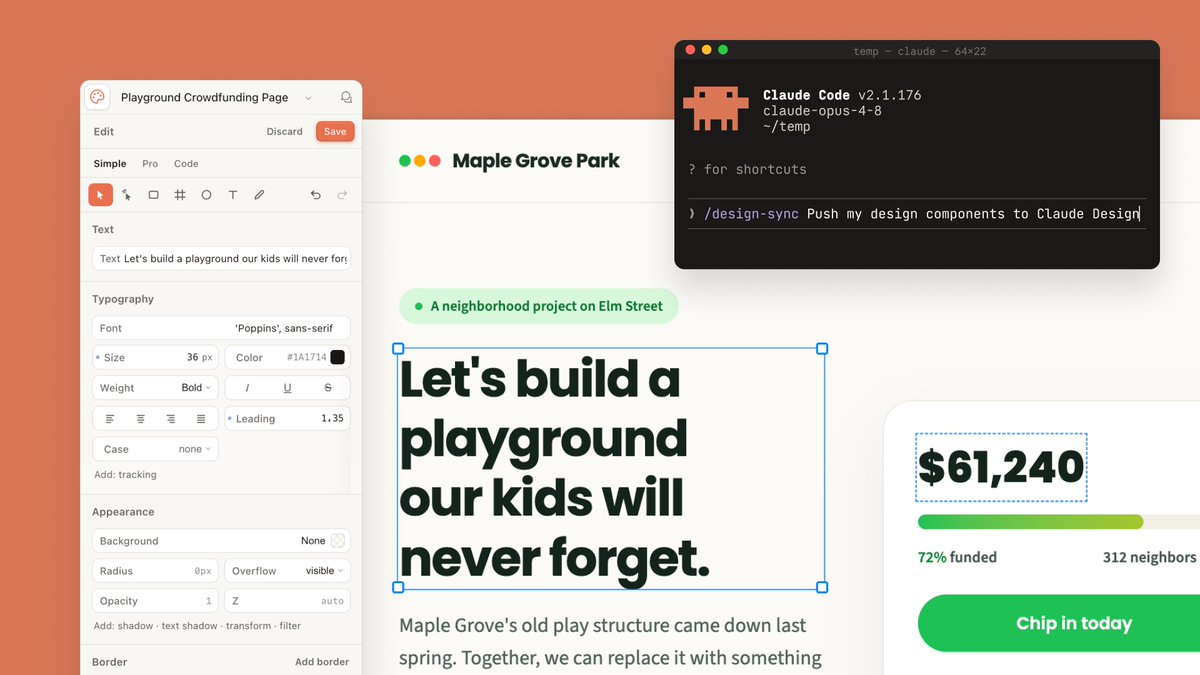
Claude Design 同步 UI 模型
生成一个精致的 SaaS 风格模型,展示设计编辑器将众筹页面与 Claude Code 终端同步的场景。
Goal: Create a polished wide 16:9 product-announcement mockup showing Claude Design and Claude Code working together on a fundraising webpage design.

Canvas: 1200×675 landscape composition with a warm coral-orange background filling the full frame. Center a large cream-white design canvas with subtle shadow, partially covered by a left editor sidebar, a right donation card, and a floating terminal window.

Layout: Use exactly 4 main interface elements: 1 left design editor panel, 1 central webpage artboard, 1 right donation progress card, and 1 floating dark terminal window in the upper-right. The artboard should sit behind the panels, with the terminal overlapping its top-right area.

Left editor panel: A rounded off-white sidebar titled “Playground Crowdfunding Page” with a small circular app icon at far left and a bell icon at far right. Below it show a top row with exactly 3 actions: “Edit”, “Discard”, and a coral “Save” button. Then show exactly 3 tabs: “Simple”, “Pro”, “Code”, with “Simple” active. Include a compact toolbar with exactly 9 visible icons: selected pointer, cursor, rectangle, grid/cross, circle, text T, pencil, undo, redo. Add labeled controls for Text, Typography, Appearance, and Border. Typography controls should include font “Poppins”, size “36 px”, color “#1A1714”, weight “Bold”, italic, underline, strikethrough, alignment icons, leading “1.35”, case “none”, and tracking. Appearance controls should include background “None”, radius “0px”, overflow “visible”, opacity “1”, and z “auto”.

Central webpage artboard: At the top of the webpage show a small logo made of exactly 3 colored dots: green, yellow, and red, followed by the site name {argument name="organization name" default="Maple Grove Park"}. Beneath it place a pale green pill tag with one green dot and the text {argument name="project label" default="A neighborhood project on Elm Street"}. The main headline must be large, bold, dark green-black, and actively selected with a thin blue bounding box and exactly 4 blue square corner handles. Headline text: {argument name="headline text" default="Let's build a playground our kids will never forget."} Break it into four lines like the image. Under the headline, show smaller gray body copy beginning “Maple Grove's old play structure came down last spring. Together, we can replace it with something”.

Right donation card: A white rounded card with a soft shadow, cropped slightly off the right edge. It contains exactly 4 visible content items: a selected amount text box reading {argument name="funding amount" default="$61,240"} with a blue dashed selection outline, a horizontal progress bar with green-to-lime fill and pale gray remainder, a status row reading “72% funded” on the left and “312 neighbors” on the right, and a large rounded green call-to-action button reading “Chip in today”.

Floating terminal window: In the upper-right, add a black macOS-style terminal with rounded corners and shadow. It has exactly 3 traffic-light dots: red, yellow, green. Window title line reads “temp — claude — 64x22”. Show a pixel-art orange Claude-like mascot icon on the left. Terminal text should include “Claude Code v2.1.176”, “claude-opus-4-8”, “~/temp”, “? for shortcuts”, and a command line reading “/design-sync Push my design components to Claude Design” with the caret at the end. Use monospaced terminal typography.

Visual style: Modern SaaS interface screenshot, clean Figma-like design controls, creamy whites, dark forest-green text, coral accent background, soft shadows, rounded corners, crisp readable UI text, high-end presentation slide aesthetic.

Constraints: Keep the composition wide and uncluttered, preserve the exact counts listed above, do not add people, do not add extra panels, and do not include watermarks.
目标:创建一个精致的 16:9 宽屏产品发布模型,展示 Claude Design 和 Claude Code 在众筹网页设计上的协同工作。
画布:1200×675 横向构图,暖珊瑚橙色背景填满整个画面。中心放置一个带有柔和阴影的奶油白色设计画布,左侧编辑器侧边栏、右侧捐赠卡片和一个浮动终端窗口部分遮盖画布。
布局:使用 4 个核心界面元素:1 个左侧设计编辑器面板、1 个中央网页项目、1 个右侧捐赠进度卡片,以及右上角 1 个浮动深色终端窗口。项目应位于面板后方,终端窗口覆盖其右上角区域。
左侧编辑器面板:一个圆角灰白色侧边栏,标题为“Playground Crowdfunding Page”,最左侧有一个小型圆形应用图标,最右侧有一个铃铛图标。下方显示一行包含 3 个操作的按钮:“Edit”、“Discard”和一个珊瑚色“Save”按钮。接着显示 3 个标签页:“Simple”、“Pro”、“Code”,其中“Simple”为激活状态。包含一个紧凑的工具栏,显示 9 个图标:选择指针、光标、矩形、网格/十字、圆形、文本 T、铅笔、撤销、重做。添加文本、排版、外观和边框的标签控件。排版控件应包括字体“Poppins”、字号“36 px”、颜色“#1A1714”、字重“Bold”、斜体、下划线、删除线、对齐图标、行距“1.35”、大小写“none”和字间距。外观控件应包括背景“None”、圆角“0px”、溢出“visible”、不透明度“1”和 z 轴“auto”。
中央网页项目:网页顶部显示一个由 3 个彩色圆点(绿、黄、红)组成的小图标,后跟站点名称 {argument name="organization name" default="Maple Grove Park"}。下方放置一个浅绿色胶囊标签,内含一个绿色圆点和文本 {argument name="project label" default="A neighborhood project on Elm Street"}。主标题必须大、粗、深绿黑色,并处于激活选中状态,带有细蓝色边框和 4 个蓝色方形角点。标题文本:{argument name="headline text" default="Let's build a playground our kids will never forget."} 像图片中那样将其分为四行。标题下方显示较小的灰色正文,开头为“Maple Grove's old play structure came down last spring. Together, we can replace it with something”。
右侧捐赠卡片:一个带有柔和阴影的白色圆角卡片,右边缘略微裁剪。包含 4 个可见内容项:一个显示 {argument name="funding amount" default="$61,240"} 的选中金额文本框(带有蓝色虚线选中边框)、一个从绿色到亮绿色的水平进度条(剩余部分为浅灰色)、一行状态栏(左侧为“72% funded”,右侧为“312 neighbors”),以及一个大的圆角绿色行动号召按钮,文字为“Chip in today”。
浮动终端窗口:在右上角添加一个带有圆角和阴影的黑色 macOS 风格终端。具有 3 个交通灯圆点:红、黄、绿。窗口标题行显示“temp — claude — 64x22”。左侧显示一个像素风橙色 Claude 风格吉祥物图标。终端文本应包括“Claude Code v2.1.176”、“claude-opus-4-8”、“~/temp”、“? for shortcuts”,以及一行命令行“/design-sync Push my design components to Claude Design”,末尾带有光标。使用等宽终端字体。
视觉风格:现代 SaaS 界面截图,简洁的 Figma 风格设计控件,奶油白,深森林绿文字,珊瑚色强调背景,柔和阴影,圆角,清晰易读的 UI 文字,高端演示 Slides 美学。
约束:保持构图宽敞且整洁,保留上述指定的精确数量,不要添加人物,不要添加额外的面板,不要包含任何水印。