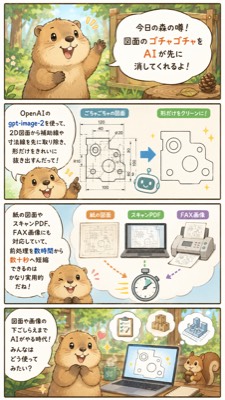
可爱的 CAD 清理说明漫画
生成一张垂直的日式吉祥物信息图,解释 AI 如何清理杂乱的 2D 技术图纸,从而加快文档准备速度。
{"type":"vertical Japanese explainer comic infographic","style":"cute 2D watercolor storybook illustration with soft ink outlines, warm forest colors, rounded speech bubbles, light cream backgrounds, friendly business-tech tone","format":{"aspect_ratio":"9:16 vertical smartphone poster","panel_count":4,"layout":"four stacked rectangular panels separated by thin dark borders"},"main_character":{"species":"raccoon or tanuki mascot","appearance":"round beige-brown body, darker ears and paws, cream muzzle and belly, big glossy eyes, cheerful open mouth, expressive small hands","role":"friendly forest rumor narrator explaining an AI workflow"},"theme":"using {argument name="AI tool name" default="gpt-image-2"} to preprocess 2D drawings by removing auxiliary guide lines, dimension lines, captions, and handwritten notes so only the clean shape remains","visible_text":{"top_title":"今日の森の噂! 図面のゴチャゴチャをAIが先に消してくれるよ!","tool_label":"OpenAIの gpt-image-2を使って、2D図面から補助線や寸法線を先に取り除く下ごしらえが、読み込みやすくなるんだって!","middle_caption":"紙の図面やスキャンPDF、FAX形式にも対応して、納品後に取引先から来た“手書きメモ入り”図面でも素早く整理できちゃうね","bottom_caption":"図面を整理してくれるまでAIがサポート。こんな使い方も増えてきたね!"},"layout":{"sections":[{"title":"forest rumor introduction","position":"top panel","count":1,"description":"the raccoon stands in a sunny forest beside a wooden sign-like speech bubble announcing that AI can erase messy drawing clutter first"},{"title":"before and after CAD cleanup","position":"second panel","count":3,"labels":["left explanation bubble with tool name","center messy 2D mechanical drawing full of dimensions and construction marks","right simplified clean outline drawing with only the main shape"],"description":"a blue arrow points from the cluttered drawing to the clean extracted shape; small sparkle marks and a tiny robot icon emphasize automation"},{"title":"document input examples","position":"third panel","count":4,"labels":["紙の図面","スキャンPDF","FAX形式","stopwatch icon"],"description":"three document cards show acceptable sources, including paper drawing, scanned PDF, and fax format, with colored arrows pointing toward a stopwatch to suggest faster preprocessing; the raccoon smiles from the lower left"},{"title":"AI-supported work scene","position":"bottom panel","count":5,"labels":["raccoon narrator","laptop with cleaned drawing","floating checklist document","floating thumbs-up badge","small squirrel assistant"],"description":"the raccoon sits at a desk in the forest with an open laptop showing a cleaned technical shape, while helpful icons float above and a squirrel watches from the right"}]},"art_direction":"keep all text legible in Japanese, use rounded sans-serif lettering, pale blue and cream UI panels, small sparkles, simple CAD-like line drawings, cozy woodland background with trees and sunlight, cute productivity infographic suitable for social media","customization":{"headline":"{argument name=\"headline text\" default=\"今日の森の噂! 図面のゴチャゴチャをAIが先に消してくれるよ!\"}","mascot":"{argument name=\"mascot animal\" default=\"raccoon\"}","workflow_result":"{argument name=\"cleanup result\" default=\"remove auxiliary lines and dimension lines, leaving only the main shape\"}"}}{"type":"垂直日式说明漫画信息图","style":"可爱的 2D 水彩故事书插画,带有柔和的墨线、温暖的森林色调、圆润的对话气泡、浅奶油色背景,以及友好的商务科技风格","format":{"aspect_ratio":"9:16 垂直智能手机海报","panel_count":4,"layout":"四个堆叠的长方形面板,由细深色边框分隔"},"main_character":{"species":"浣熊或狸猫吉祥物","appearance":"圆滚滚的米棕色身体,深色的耳朵和爪子,奶油色的口鼻部和腹部,大而有光泽的眼睛,开心的张嘴表情,富有表现力的小手","role":"友好的森林传闻讲述者,解释 AI 工作流程"},"theme":"使用 {argument name="AI tool name" default="gpt-image-2"} 通过移除辅助引导线、尺寸线、标题和手写注释来预处理 2D 图纸,只保留干净的形状","visible_text":{"top_title":"今天的森林传闻! AI 可以先帮你清理图纸上的杂乱内容!","tool_label":"听说使用 OpenAI 的 gpt-image-2,可以先从 2D 图纸中去除辅助线和尺寸线,让图纸变得更容易阅读!","middle_caption":"支持纸质图纸、扫描版 PDF 和传真格式,即使是客户发来的带有“手写备注”的图纸也能快速整理","bottom_caption":"AI 辅助整理图纸。这种用法也变得越来越普遍了呢!"},"layout":{"sections":[{"title":"森林传闻介绍","position":"顶部面板","count":1,"description":"浣熊站在阳光明媚的森林里,旁边是一个木牌形状的对话气泡,宣布 AI 可以先擦除杂乱的图纸内容"},{"title":"CAD 清理前后对比","position":"第二个面板","count":3,"labels":["左侧工具名称说明气泡","中间充满尺寸和施工标记的杂乱 2D 机械图","右侧仅保留主要形状的简化干净轮廓图"],"description":"一个蓝色箭头从杂乱的图纸指向提取出的干净形状;小闪光标记和一个微型机器人图标强调了自动化过程"},{"title":"文档输入示例","position":"第三个面板","count":4,"labels":["纸质图纸","扫描版 PDF","传真格式","秒表图标"],"description":"三张文档卡片展示了可接受的来源,包括纸质图纸、扫描 PDF 和传真格式,彩色箭头指向秒表以暗示更快的预处理速度;浣熊在左下角微笑"},{"title":"AI 辅助工作场景","position":"底部面板","count":5,"labels":["浣熊讲述者","显示已清理图纸的笔记本电脑","浮动的清单文档","浮动的点赞徽章","小松鼠助手"],"description":"浣熊坐在森林里的书桌前,打开的笔记本电脑显示着清理后的技术形状,上方漂浮着有用的图标,一只松鼠在右侧观看"}]},"art_direction":"保持所有日语文字清晰可辨,使用圆润的无衬线字体,浅蓝色和奶油色的 UI 面板,小闪光,简单的 CAD 风格线条图,带有树木和阳光的舒适林地背景,适合社交媒体的可爱生产力信息图","customization":{"headline":"{argument name=\"headline text\" default=\"今天的森林传闻! AI 可以先帮你清理图纸上的杂乱内容!\"}","mascot":"{argument name=\"mascot animal\" default=\"浣熊\"}","workflow_result":"{argument name=\"cleanup result\" default=\"移除辅助线和尺寸线,仅保留主要形状\"}"}}