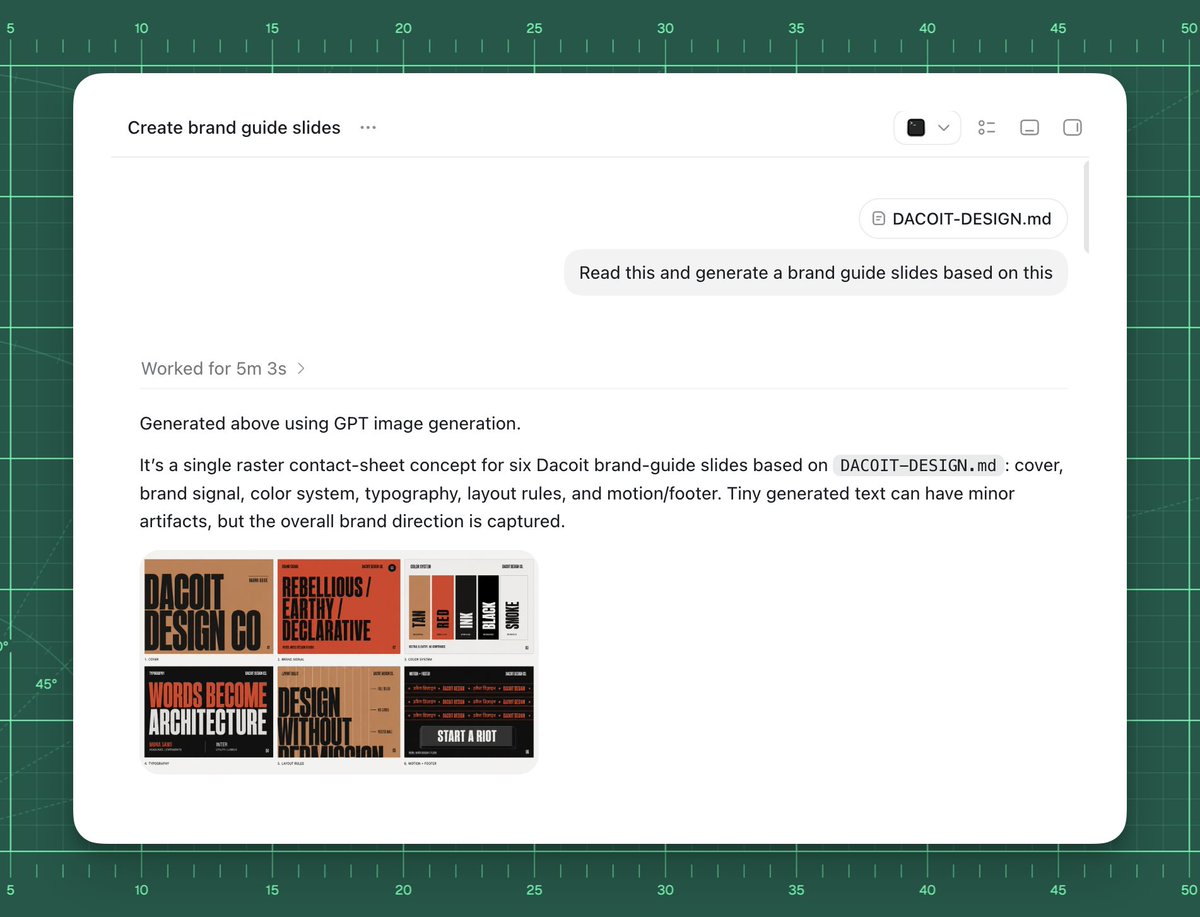
AI 品牌指南生成 UI
创建一个简洁的 AI 工作区截图,展示将 Markdown 品牌文件转换为六张 Slides 的 Dacoit 风格品牌指南联系表的过程。
Goal: Create a polished screenshot-style UI mockup showing an AI chat or agent workspace successfully generating brand guide slides from a markdown file.

Canvas: 4:3 landscape composition, approximately 1024×768. Background is a dark green cutting-mat grid with ruler markings around the top and left edges, thin mint grid lines, measurement numbers from 5 to 50, small tick marks, and a few faint diagonal guide lines. Center a large rounded white app window with a soft shadow, leaving the green grid visible as a border.

App window layout: The white panel has rounded corners and a minimal toolbar. At top left, show the title text “Create brand guide slides” followed by a three-dot menu. At top right, include exactly 4 small toolbar icons: a dark square icon with a dropdown chevron, a list/settings icon, a small rectangle icon, and a split-panel icon. A thin horizontal divider runs under the toolbar. Near the upper right of the chat area, show a rounded attachment chip labeled “DACOIT-DESIGN.md”, then below it a light gray user message bubble reading “Read this and generate a brand guide slides based on this”. Add a subtle vertical scrollbar on the far right inside the window.

Main response content: In the left-middle area, show a muted status line “Worked for {argument name="processing time" default="5m 3s"} ›”. Below a divider, show the response text: “Generated above using GPT image generation.” Then a paragraph: “It’s a single raster contact-sheet concept for six Dacoit brand-guide slides based on `DACOIT-DESIGN.md`: cover, brand signal, color system, typography, layout rules, and motion/footer. Tiny generated text can have minor artifacts, but the overall brand direction is captured.” Use clean modern sans-serif UI typography, black and gray text, generous spacing.

Embedded generated image thumbnail: Under the paragraph, place one rounded-corner thumbnail preview of a six-slide brand-guide contact sheet. It must contain exactly 6 mini slide panels in a 3×2 grid. The style of the mini slides is gritty editorial branding with tan, burnt orange, black, cream, and red. Count and depict the six visible slide topics: 1) cover slide with huge text “DACOIT DESIGN CO”, 2) brand signal slide with “REBELLIOUS / EARTHY / DECLARATIVE”, 3) color system slide with vertical swatches labeled roughly TAN, RED, INK, BLACK, SMOKE, 4) typography slide with large words “WORDS BECOME ARCHITECTURE”, 5) layout rules slide with “DESIGN WITHOUT APOLOGY”, 6) motion/footer slide with dark background and “START A RIOT”. The tiny text may be imperfect but the large labels should be recognizable.

Visual style: High-fidelity product screenshot, crisp white interface, subtle shadows, realistic browser/app chrome, minimal monochrome icons, sharp readable text, clean spacing. The background should feel like a design workspace or drafting mat.

Customizable source/brand details: Use {argument name="project title" default="Create brand guide slides"} as the window title if changed. Use {argument name="file name" default="DACOIT-DESIGN.md"} for the attachment chip and paragraph reference. Use {argument name="brand name" default="Dacoit"} for the brand guide subject. Use {argument name="user request" default="Read this and generate a brand guide slides based on this"} as the message bubble text.

Constraints: Do not add people, hands, browser address bars, extra popups, watermarks, or unrelated UI. Keep exactly one app window, one attachment chip, one user message bubble, one status line, one response paragraph block, and one embedded thumbnail containing exactly six mini slides.
目标:创建一个精致的截图风格 UI 模型,展示 AI 聊天或 Agent 工作区成功从 Markdown 文件生成品牌指南 Slides。
画布:4:3 横向构图,约 1024×768。背景为深绿色切割垫网格,顶部和左侧边缘带有刻度标记,细薄的薄荷绿网格线,测量数值从 5 到 50,带有小刻度线和几条淡淡的对角辅助线。中心放置一个带有柔和阴影的大型圆角白色应用窗口,保留绿色网格作为边框可见。
应用窗口布局:白色面板具有圆角和极简工具栏。左上角显示标题文本“Create brand guide slides”,后跟一个三点菜单。右上角包含 4 个小型工具栏图标:一个带有下拉箭头的深色方形图标、一个列表/设置图标、一个小矩形图标和一个分屏图标。工具栏下方有一条细水平分隔线。在聊天区域右上角附近,显示一个标有“DACOIT-DESIGN.md”的圆角附件卡片,下方是一个浅灰色用户消息气泡,内容为“Read this and generate a brand guide slides based on this”。在窗口最右侧添加一个细微的垂直滚动条。
主要回复内容:在左中部区域,显示一行静音状态栏“Worked for {argument name="processing time" default="5m 3s"} ›”。在分隔线下方,显示回复文本:“Generated above using GPT image generation.” 然后是一段话:“It’s a single raster contact-sheet concept for six Dacoit brand-guide slides based on `DACOIT-DESIGN.md`: cover, brand signal, color system, typography, layout rules, and motion/footer. Tiny generated text can have minor artifacts, but the overall brand direction is captured.” 使用简洁的现代无衬线 UI 字体,黑色和灰色文本,宽裕的间距。
嵌入式生成图像缩略图:在段落下方,放置一个圆角缩略图预览,展示六张品牌指南 Slides 的联系表。它必须包含 3×2 网格中的 6 个小型 Slide 面板。小型 Slide 的风格为粗犷的编辑品牌设计,采用棕褐色、焦橙色、黑色、奶油色和红色。计数并描绘六个可见的 Slide 主题:1) 带有巨大文本“DACOIT DESIGN CO”的封面 Slide,2) 带有“REBELLIOUS / EARTHY / DECLARATIVE”的品牌信号 Slide,3) 带有垂直色块的色彩系统 Slide,标记大致为 TAN、RED、INK、BLACK、SMOKE,4) 带有大字“WORDS BECOME ARCHITECTURE”的排版 Slide,5) 带有“DESIGN WITHOUT APOLOGY”的布局规则 Slide,6) 带有深色背景和“START A RIOT”的动态/页脚 Slide。微小的文本可能不完美,但大标签应该是可识别的。
视觉风格:高保真产品截图,清爽的白色界面,细微的阴影,逼真的浏览器/应用外壳,极简的单色图标,清晰易读的文本,整洁的间距。背景应呈现出设计工作区或绘图垫的感觉。
可自定义的来源/品牌详情:如果更改,请使用 {argument name="project title" default="Create brand guide slides"} 作为窗口标题。附件卡片和段落引用请使用 {argument name="file name" default="DACOIT-DESIGN.md"}。品牌指南主题请使用 {argument name="brand name" default="Dacoit"}。消息气泡文本请使用 {argument name="user request" default="Read this and generate a brand guide slides based on this"}。
约束:不要添加人物、手部、浏览器地址栏、额外的弹出窗口、水印或不相关的 UI。保持仅有一个应用窗口、一个附件卡片、一个用户消息气泡、一个状态行、一个回复段落块和一个包含恰好六个小型 Slides 的嵌入式缩略图。