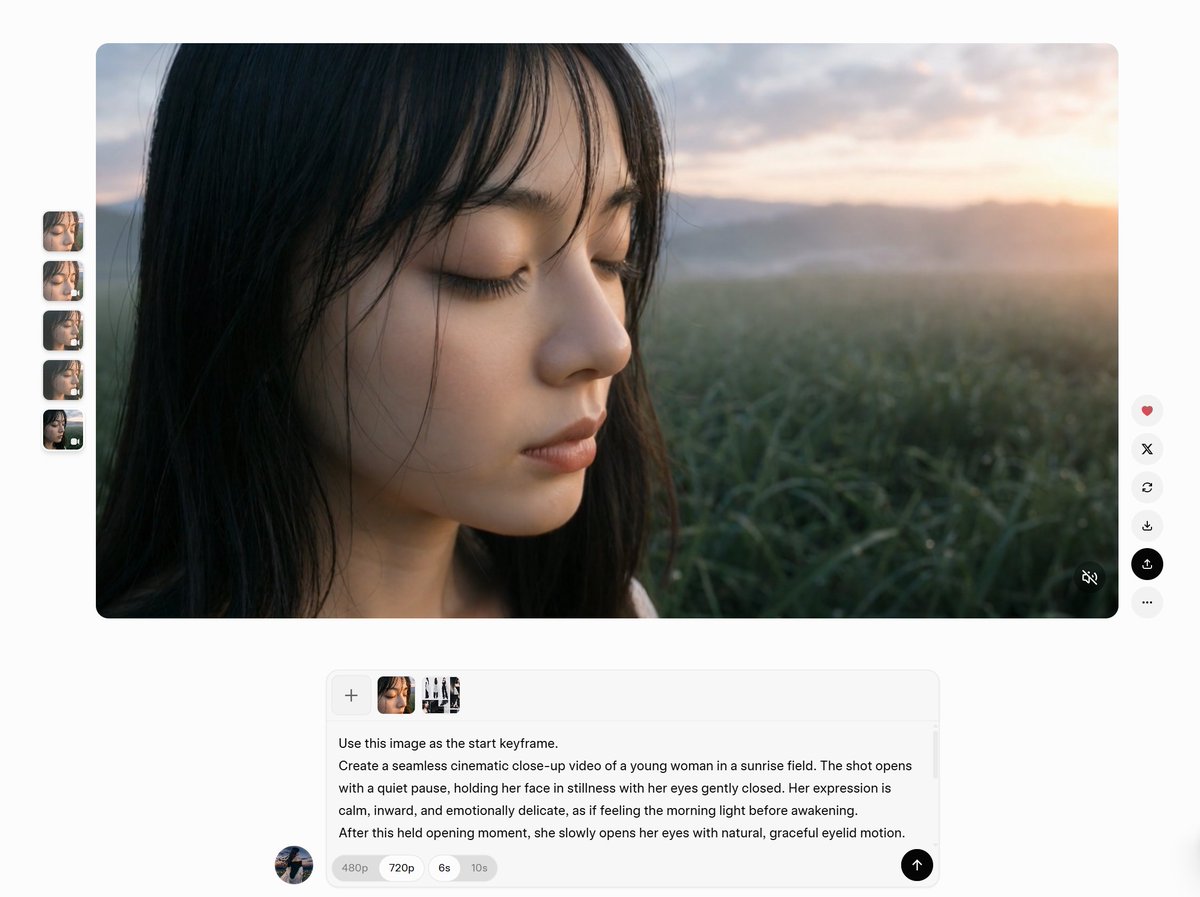
AI 视频工作区截图
一张 AI 视频生成工具的逼真 UI 截图,展示了带有遮挡的日出肖像关键帧、缩略图栏、操作按钮以及提示词编辑器。
Goal: Create a clean web-app interface screenshot showing an AI video-generation workspace with a large cinematic preview image and a text prompt composer below it.

Canvas: Wide 16:9 screenshot on a very light gray background, minimal modern UI, soft shadows, rounded corners, lots of white space.

Main preview: Place one large rounded-rectangle preview panel centered near the top, about 85% of the canvas width and 60% of the canvas height. The preview shows a photorealistic close-up of {argument name="main subject" default="a young woman with long dark hair"} standing in a dewy green field at sunrise. Her face is mostly covered by a large opaque square privacy block in the center, colored dark warm brown. Visible details include dark hair on the left side, a small part of the lower face and neck below the block, misty grass in the foreground, distant hills, a bright warm sunrise glow on the right, and a soft cinematic shallow-depth-of-field look.

Left thumbnail rail: On the left side of the preview, show exactly 5 small vertical rounded thumbnails stacked evenly. The 5 thumbnails are: 1) close-up face with eyes closed, 2) close-up face with a small overlay icon, 3) side-profile close-up, 4) blurred brown square privacy-block image, 5) darker blurred image with a tiny overlay icon.

Right action toolbar: On the right side of the preview, show exactly 6 circular floating buttons stacked vertically. The 6 buttons are: 1) heart icon in red, 2) X icon, 3) circular refresh arrow, 4) download arrow, 5) black highlighted upload/share icon, 6) three-dot more menu. Add a small muted-audio icon in the bottom-right corner inside the preview panel.

Prompt composer: Below the preview, centered, create a rounded white prompt input card with a subtle border and shadow. At the top-left of the card show exactly 4 small attachment tiles in a row: 1) a plus button, 2) a cropped brown-face thumbnail, 3) a face/portrait thumbnail, 4) a small character-sheet-like thumbnail with multiple figures. Under the attachments, include this readable English prompt text: "Use this image as the start keyframe. Create a seamless cinematic close-up video of a young woman in a sunrise field. The shot opens with a quiet pause, holding her face in stillness with her eyes gently closed. Her expression is calm, inward, and emotionally delicate, as if feeling the morning light before awakening. After this held opening moment, she slowly opens her eyes with natural, graceful eyelid motion." Use {argument name="quality label" default="720p"} as the selected pill in a row of small option pills, with neighboring pills labeled "480p", "6s", and "10s". Place a black circular send button with an upward arrow at the bottom-right of the card.

Additional details: Add a small circular user avatar near the lower-left of the composer area. Keep typography small, clean, sans-serif, and UI-like. The overall impression should be a realistic screenshot of a video prompt tool, not a standalone photograph. Do not add extra buttons, extra thumbnails, watermarks, browser chrome, or unrelated text.
目标:创建一个简洁的 Web 应用界面截图,展示一个 AI 视频生成工作区,包含一个大型电影感预览图像及其下方的文本提示词编辑器。
画布:宽屏 16:9 截图,背景为极浅的灰色,采用极简现代 UI 设计,带有柔和阴影、圆角和大量留白。
主预览区:在画布上方居中放置一个大型圆角矩形预览面板,宽度约占画布的 85%,高度约占 60%。预览内容显示一张照片级逼真的特写,主角为 {argument name="main subject" default="一位留着深色长发的年轻女性"},站在日出时分露水盈盈的绿色田野中。她的脸部中心被一个大型不透明的深暖棕色方形隐私遮挡块遮盖。可见细节包括左侧的深色头发、遮挡块下方露出的部分下颌和颈部、前景中朦胧的草地、远处的山丘、右侧明亮温暖的日出光晕,以及柔和的电影级浅景深效果。
左侧缩略图栏:在预览区左侧,垂直均匀堆叠 5 个小型圆角缩略图。这 5 个缩略图分别为:1) 闭眼脸部特写,2) 带有小图标覆盖的脸部特写,3) 侧脸特写,4) 模糊的棕色方形隐私遮挡块图像,5) 带有微小覆盖图标的深色模糊图像。
右侧操作工具栏:在预览区右侧,垂直堆叠 6 个圆形悬浮按钮。这 6 个按钮分别为:1) 红色心形图标,2) X 图标,3) 循环刷新箭头,4) 下载箭头,5) 黑色高亮上传/分享图标,6) 三点更多菜单。在预览面板右下角添加一个小型静音图标。
提示词编辑器:在预览区下方居中位置,创建一个带有细微边框和阴影的白色圆角提示词输入卡片。在卡片左上方并排显示 4 个小型附件磁贴:1) 加号按钮,2) 裁剪后的棕色脸部缩略图,3) 脸部/肖像缩略图,4) 包含多个形象的小型角色表风格缩略图。在附件下方,包含以下可读的英文提示词文本:"Use this image as the start keyframe. Create a seamless cinematic close-up video of a young woman in a sunrise field. The shot opens with a quiet pause, holding her face in stillness with her eyes gently closed. Her expression is calm, inward, and emotionally delicate, as if feeling the morning light before awakening. After this held opening moment, she slowly opens her eyes with natural, graceful eyelid motion." 使用 {argument name="quality label" default="720p"} 作为选项行中选中的胶囊按钮,相邻的胶囊按钮分别标注为 "480p"、"6s" 和 "10s"。在卡片右下角放置一个带有向上箭头的黑色圆形发送按钮。
其他细节:在编辑器区域左下方添加一个小型的圆形用户头像。保持字体小巧、清晰、无衬线,呈现 UI 风格。整体观感应为视频提示词工具的逼真截图,而非独立照片。请勿添加额外的按钮、多余的缩略图、水印、浏览器边框或无关文本。